fields
Description
Filters displayed fields. Allows adding fields to the query or excluding them from it. Supports wildcard.
Syntax
fields <filter-options> <field-list>
Required arguments
| Parameter | Syntax | Description |
|---|---|---|
<field-list> | <field>* [, <field>*] | List of fields to filter. Supports wildcard. |
Optional arguments
| Parameter | Syntax | Default | Description |
|---|---|---|---|
<filter-options> | (+|-) | + | + indicator that the listed fields should remain, - indicator that the listed fields should be removed from the result. |
The + indicator can be omitted.
Examples
Example 1
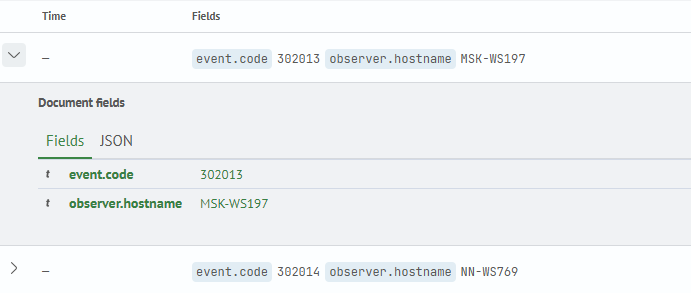
The source network_indexes contains network events. In this example, the fields command limits the output to only the fields event.code and observer.hostname.

As a result, the output will contain exclusively the specified fields.
source network_indexes
| fields event.code, observer.hostname
Example 2
The source food_orders contains order information. The fields command excludes the fields type and operation_status from the output.

As a result, the specified fields will be removed from the dataset. The field type is enclosed in quotes so that the interpreter correctly recognizes the field name.
source food_orders
| fields - 'type', operation_status

Example 3
The source winevents contains Windows event logs. In this example, wildcards are used to filter fields:
event*— selects all fields starting with the prefixevent*target*— selects all fields containing the substringtarget

As a result, only the fields that match the specified masks will be presented in the output.
source winevents
| fields event*, *target*

Example 4
The source web_indexes contains network requests to the web server.
This example demonstrates comprehensive data processing:
- The
tablecommand forms a tabular output with the specified fields - The
evalcommand calculates the response body size in kilobytes and saves the result in the fieldkbytes - The
fieldscommand with the-prefix excludes unnecessary fields from the result
source web_indexes
| table @timestamp, user.name, user_agent.name, url.path, http.response.status_code, http.response.body.bytes
| eval kbytes=if(isnull(http.response.body.bytes), "-", round(http.response.body.bytes/1024))
| fields - http.response.body.bytes, *status*, user*
The result of executing the query will be a table containing only the remaining fields:
| kbytes | @timestamp | url.path |
|---|---|---|
| 10 | 2025-05-30T17:42:39.729492Z | /walk/stove |
| 45 | 2025-05-30T17:41:53.013623Z | /drink.jpg |
| 9 | 2025-05-30T17:41:06.937597Z | /fuel |
| 12 | 2025-05-30T17:42:24.324308Z | /quilt |
| 47 | 2025-05-30T17:38:23.999864Z | /drink.ico |
Example 5
In this example, the wildcard event.* excludes the entire group of nested fields starting with event.:
source radius_logs
| fields - event.*