Integration with Incident Manager
Registering incidents based on threat detection rules
Threats detected by the EDR agent are registered in the Incident Manager. The implemented mechanism allows processing threats using the functional capabilities of the Incident Manager.

Rule settings
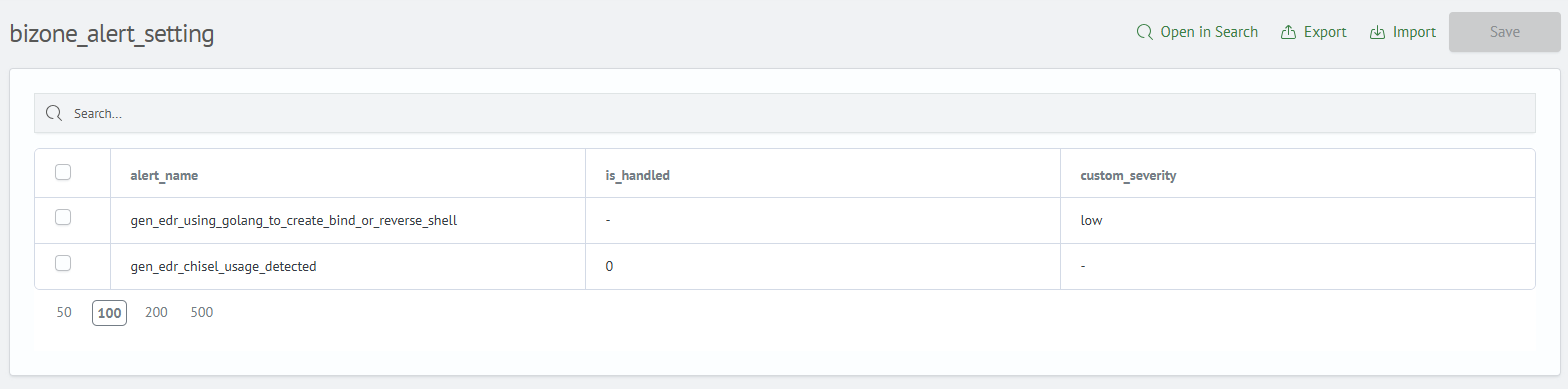
By default, all rules generated in BI.ZONE EDR are registered (directory - dim_bizone_rule). The incident criticality corresponds to the rule's criticality. The directory bizone_alert_setting is used to manage alert registration and rule criticality.
- To change criticality, add a row with the required
alert_nameand specify the necessary criticality level in thecustom_severityfield. - Add
alert_nameand setis_handledto one to prevent incident registration for this rule.
Launching EDR tasks
Launching a task as a response to an incident is available in the Incident Manager interface.

Tasks are divided into three categories depending on the incident type:
- General tasks – applied to all incidents, regardless of platform.
- Linux tasks – used for responding to incidents detected on servers and workstations running Linux family operating systems.
- Windows tasks – intended for processing incidents detected on servers and workstations running the Windows operating system.
The list of available active actions is automatically formed based on the operating system type on which the threat was detected.
Features of active actions:
- For each task, an interface with fields is created based on the task parameters.
- Incident fields are converted into task parameters using mapping.

Viewing task results
Results of tasks launched from the Incident Manager are available on the Smart EDR: Task Results dashboard:
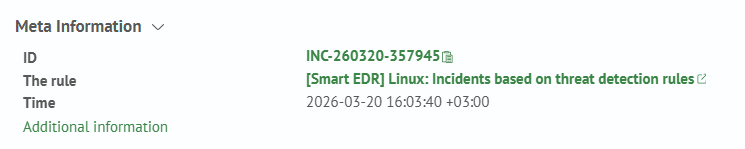
 Transition to the dashboard with device substitution in the filter is available in the incident card (
View additional information):
Creating custom responses
The capability to create custom responses to incidents, including a sequence of multiple EDR tasks, is provided. Responses are formed as Python scripts and stored on the Smart Monitor Web server in the /app/opensearch-dashboards/config/actions directory. To create such responses:
-
Go to the
/app/opensearch-dashboards/config/actionsdirectory. -
Create a script (use
remove_immutable_bit.pyas a template). -
Restart
Smart Monitor Web:systemctl restart opensearch-dashboards -
Go to the section:
Navigation Menu-System Parameters-Module Settings-Incident Manager-Active Actions -
Create a new active action, specifying:
- incident fields:
dev_id- mandatory- OS type (
linux,windows) for which the response is available - the created script from the list.
Example script (remove_immutable_bit.py):
import json
import os
import urllib3
from jinja2 import Environment, BaseLoader

from run_task import run_task

urllib3.disable_warnings(urllib3.exceptions.InsecureRequestWarning)


if __name__ == '__main__':
    data = input()
    data_dict = json.loads(data)
    # settings
    base_path = os.path.abspath(os.path.dirname(__file__))
    support_tasks_path = os.path.join(base_path, 'tasks.json')
    # task metadata
    with open(support_tasks_path, 'r') as f:
        support_tasks = json.load(f)
    # edr settings
    with open(os.path.join(base_path, 'bizone_edr_settings.json'), 'r') as f:
        bizone_edr_settings = json.load(f)
    # parameters
    incident_data = data_dict['metadata'].get('fields')
    agents = [incident_data.get('dev_id')]
    # execute tasks
    # remove immutable bit
    task_id = [t for t in support_tasks if t['name'] == '[BZ] [All] Run command'][0]['id']
    params = {
        'command': 'sudo chattr -i ~/.bash_history',
        'timeout': 1800,
        'mode': 'current'
    }
    run_task(bizone_edr_settings['host'], bizone_edr_settings['token'], task_id, agents, params)
    # verify attribute is removed
    task_id = [t for t in support_tasks if t['name'] == '[BZ] [All] Get file properties'][0]['id']
    params = {
        'filePath': '/root/.bash_history',
    }
    run_task(bizone_edr_settings['host'], bizone_edr_settings['token'], task_id, agents, params)
    # check history file for suspicious commands
    task_id = [t for t in support_tasks if t['name'] == '[BZ] [Nix] Get command history (one-shot)'][0]['id']
    run_task(bizone_edr_settings['host'], bizone_edr_settings['token'], task_id, agents)
    # get users and groups
    task_id = [t for t in support_tasks if t['name'] == '[BZ] [Nix] Get list of users and groups (one-shot)'][0]['id']
    run_task(bizone_edr_settings['host'], bizone_edr_settings['token'], task_id, agents)
    # get processes
    task_id = [t for t in support_tasks if t['name'] == '[BZ] [Nix] List processes'][0]['id']
    run_task(bizone_edr_settings['host'], bizone_edr_settings['token'], task_id, agents)
    # network connections
    task_id = [t for t in support_tasks if t['name'] == '[BZ] [Nix] Get network connections'][0]['id']
    run_task(bizone_edr_settings['host'], bizone_edr_settings['token'], task_id, agents)
Configuring the active action:
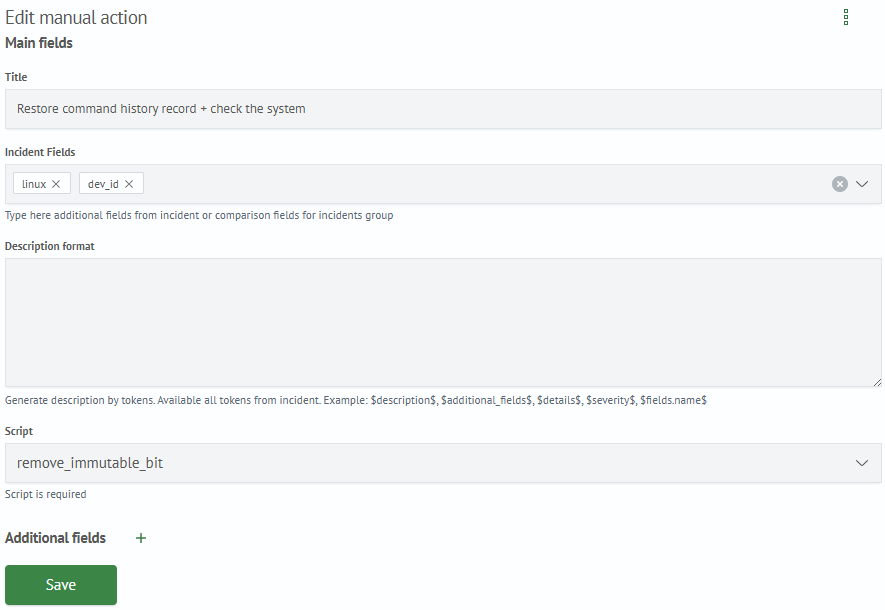
Custom response in Incident Manager:
