UBA Alert
The UBA Alert Job Scheduler action records a UBA alert. It is used by jobs created through a profiling policy reaction and by jobs created manually in Job Scheduler.
To add the action to a job, go to Main Menu - Job Scheduler - Jobs List, open the job, and select Add - UBA Alert on the Active Actions tab.
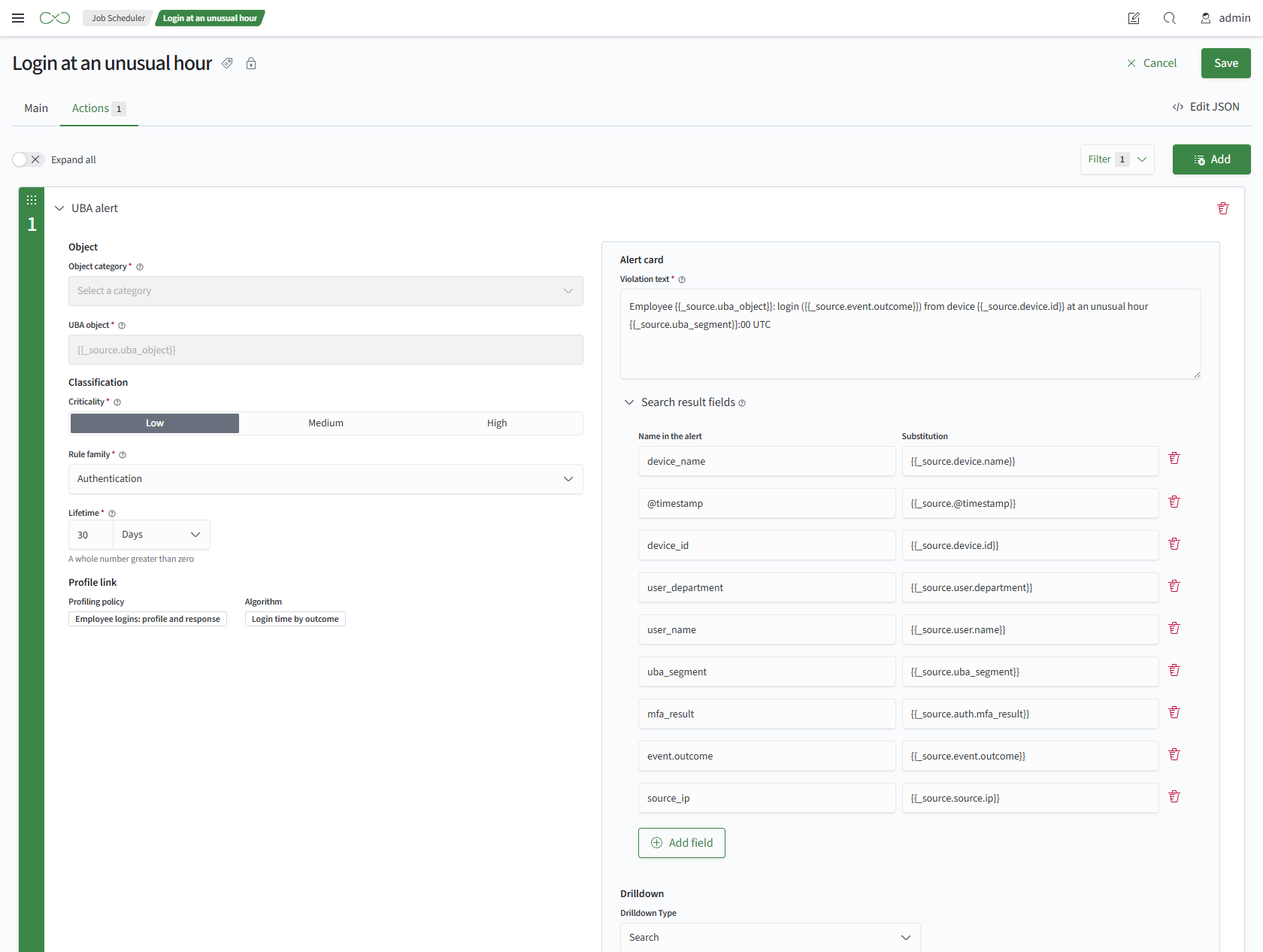
Action Parameters
Required parameters:
- Object Category - the category to which the object belongs
- UBA Object - substitution of an object field from the query result, for example
{{_source.uba_object}} - Severity - low, medium, or high
- Rule Family - a value from the Rule Families lookup
- Violation Text - text with substitutions from query result fields
- Lifetime - seconds, minutes, hours, or days. The default is one day
Optional parameters:
- Fields from Search Results - fields copied from the query result into the alert
- Details - a search or a link
Important
For a job created by a reaction, the object, category, and profile relationship are set by the builder and cannot be edited.
Alert Contents
The action records one alert for each row returned by the query. An alert contains:
- alert time - when the alert was recorded
- object - the object value from the query result, used to match the alert to a UBA object
- object category, severity, and rule family - from the action parameters. The family name is stored in the alert, so renaming the family does not change recorded alerts
- violation text - with values substituted from the query result
- fields from search results - if configured
- details - if configured
- expiration time - the recording time plus
Lifetime. The alert remains active and contributes to the score until then - Job Scheduler job that recorded the alert and, for reaction-created jobs, the profiling policy and algorithm
The alert ID is passed to subsequent actions in the job.
Details
- Search - a search query with time boundaries
- Link - an arbitrary URL, such as a dashboard URL
Substitutions work only in the query and URL. The search time boundaries are passed unchanged.