Run Statistics
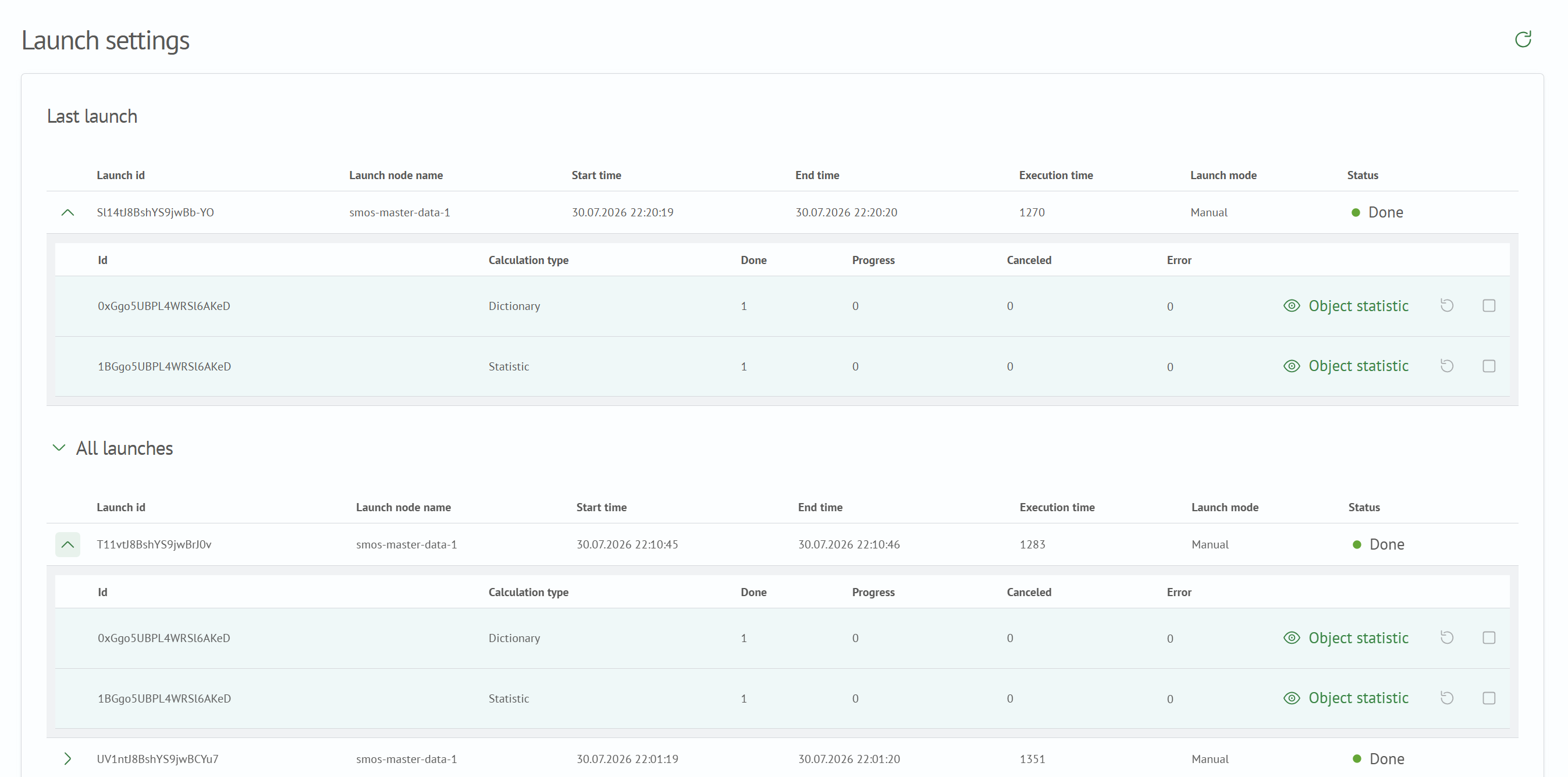
This page provides information about the latest and previous profiling policy runs. Management actions are also available for the latest run.
Page Contents
Latest Run
The Latest Run section displays statistics for the latest policy run as a row in the
runs table. Click the arrow icon in the first column to view detailed information about the run.
Previous Runs
The Previous Runs section displays statistics for all previous policy runs in the
runs table. Click the arrow icon in the first column to view detailed information about a run.
Runs Table Contents
The runs statistics table contains the following information:
- Run ID - run identifier
- Run Node Name - name of the cluster node on which the run is being or was performed
- Start Time - run start time
- End Time - run completion time
- Execution Time (ms) - time between the start and completion of the run
- Run Mode - type of run initiator. For details, see Run Mode
- Status - policy execution status. For details, see Run Status
Click the arrow button in the first column to open the run statistics details table.
Run Statistics Details Table Contents
The run statistics details table contains the following information:
- ID - algorithm identifier
- Algorithm Type - name of the algorithm type
- Completed - number of objects with the
Completedstatus - In Progress - number of objects with the
In Progressstatus - Cancelled - number of objects with the
Cancelledstatus - Error - number of objects with the
Errorstatus
The following actions are also available in the table:
- Object Statistics - open object-level run statistics for an individual algorithm
- Restart Algorithm - restart an individual policy algorithm
- Cancel Algorithm Execution - cancel an individual policy algorithm
Run Status
A run can have one of the following statuses:
- In Progress - calculation is currently running
- Completed - calculations completed successfully
- Error - calculation failed
- Warning - calculation completed with warnings
- Cancelled - calculation was cancelled
If a calculation fails, click its status to open a dialog containing the error description.

Run Mode
A run can use one of the following modes:
- Manual Run - the profiling policy is started using the
Run Policyaction - Scheduled - the profiling policy starts according to its schedule
- Restart - the profiling policy is restarted
Restart
A restart is available if the latest run has the Warning or Error status.
For a run with the Warning status, calculations are repeated for objects with the Error status.
For a run with the Error status, the entire policy is recalculated.
If the latest policy run has the Warning or Error status, you can
restart the policy.
If the latest policy run has the Warning status, you can restart an individual algorithm
or restart individual objects.
Cancelling Execution
Cancelling policy execution is available for profiling policy runs with the
In Progress status.
For runs with the In Progress status, you can also
cancel an individual algorithm or
cancel individual objects.