Identification Rules
An identification configuration defines which module fields make messages belong to the same object. For example, if the Hosts configuration maps the host field of the Incident Manager to the hostname field of Inventory, messages from both modules about the host srv-01 end up in the card of one object.
To open the list of configurations, go to Main Menu - Broker - Identification rules.
Creating a Configuration
To create an identification configuration:
- Click
Create configurationand enter a name - In the
Modulessection, select the modules whose messages should be used. In theWhat we take from the chosen modulessection, you can keep only the message types you need - In the
Mapping fieldssection, clickFill automaticallyor add fields manually and set their parameters - Set the object name template and check the example objects in the
Previewsection - Click
Create and run
A new configuration identifies objects from the messages that arrive after it is created. To identify objects from messages received earlier as well, run a rebuild.
Mapping Fields
A mapping field combines fields of different modules that carry the same value, for example the host field of the Incident Manager and the hostname field of Inventory.
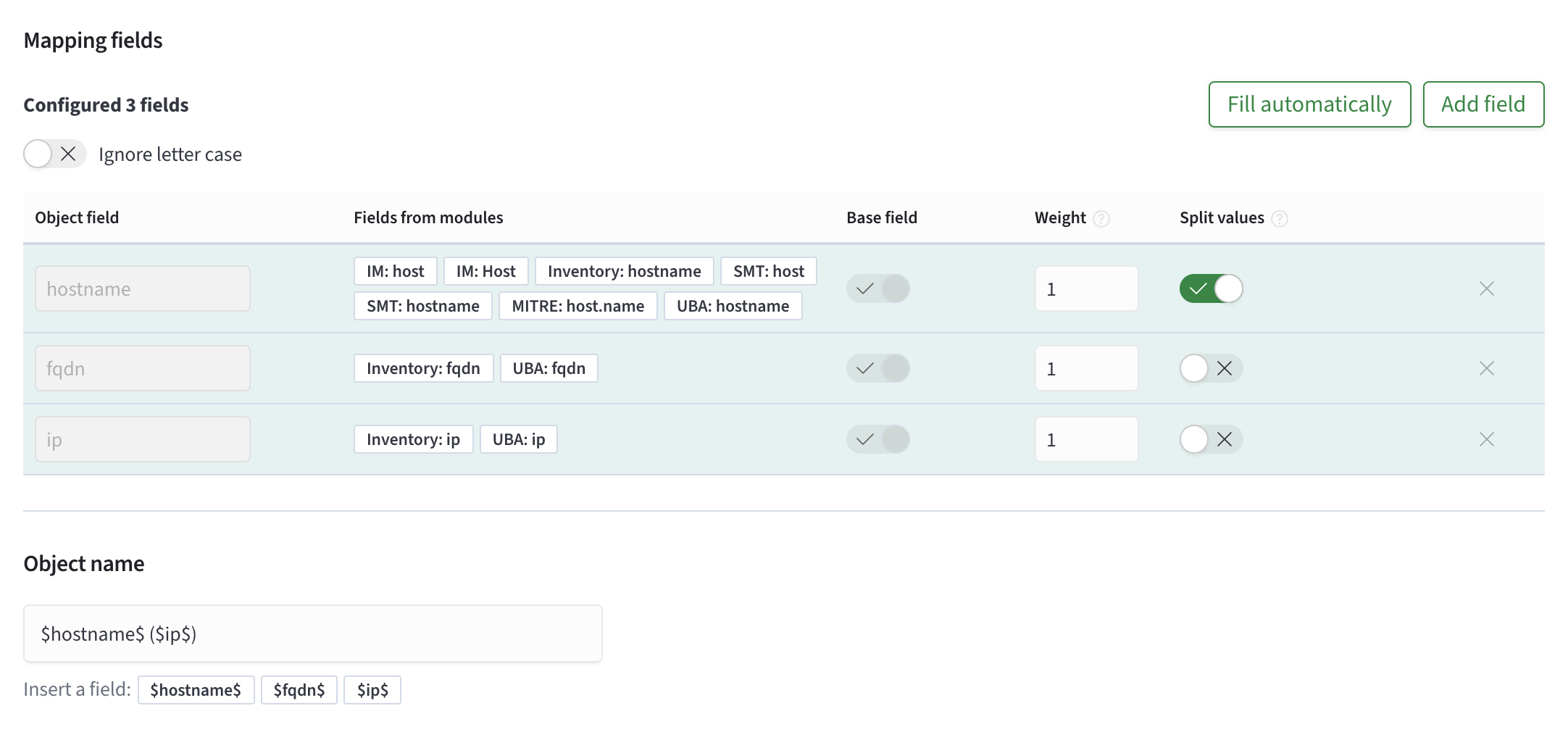
| Parameter | Purpose |
|---|---|
Base field | objects differ from each other by the values of base fields, and the other fields are shown in the card as reference fields. A configuration must have at least one base field |
Weight | the higher the weight of a field, the more a match on it counts compared with the other fields |
Split values | if the field contains several values in one message, each value belongs to a separate object |
Ignore letter case | values that differ only in letter case, for example SRV-01 and srv-01, are treated as equal. The parameter applies to all fields of the configuration |
Object Name
The object name template sets the object's name in the list and in the card. A field value is inserted into the template as $<field name>$, for example $hostname$ ($ip$). The template must contain at least one base field, otherwise the object may end up without a name.
Changing a Configuration
To change a configuration, click its name in the list. The names of base fields cannot be changed after the configuration is created.
To stop the configuration from identifying objects from new messages, select Disable in the configuration's action menu.
Rebuild
A rebuild identifies objects again from all messages of the configuration's modules, using its current settings. A rebuild is needed if the configuration was created after the messages reached the journal, or if its fields were changed.
To start a rebuild, select Rebuild in the configuration's action menu. A disabled configuration cannot be rebuilt.
Deleting a Configuration
To delete a configuration, select Delete in the action menu and confirm the deletion.
Deleting a configuration also deletes its objects and the links between them. Messages in the journal are kept.