Workflow Transition
Overview
A workflow defines incident statuses and the transitions between them. Active actions can be bound to a transition, and then they run automatically when the incident changes its status.
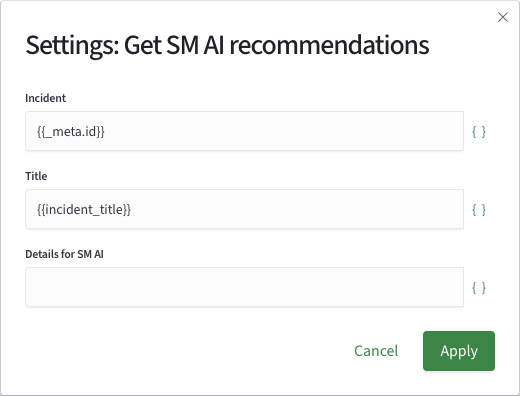
For each transition action, you can specify the sources of its input parameter values.
For more information about workflows, see Workflow Settings.
Primary and Other Actions
Transition actions run in two stages:
Primary Actions | Other Actions | |
|---|---|---|
| When they run | Before the incident status changes | After the status changes, asynchronously — the analyst does not wait for them to finish |
| Writing to incident fields | Available | Not available: the status has already changed, the incident is not modified |
| Processing an incident group | Run for each incident separately | Can run once for the entire incident group |
Primary actions are suitable for operations whose results must be recorded in the incident, such as assigning an owner or creating a ticket and recording its number. Other actions are suitable for notifications and operations in external systems that should not delay the status change.
The Run Other Actions Once flag runs other actions once for the entire group instead of once per incident.
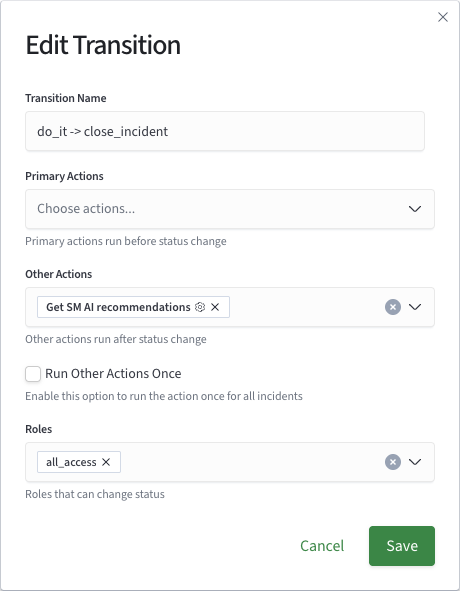
Configuring a Transition Action
Active actions in a workflow are configured in the same way as in Job Scheduler. Only the set of available tokens differs.
Within each stage, actions run in the order in which they were added. Each run is recorded in the incident history.
Use script-based active actions for new transitions.