Scripts
Overview
A script is an executable file that implements the logic of an active action. The script runs on a Smart Monitor node using the interpreter specified in its settings.
Besides the code, a script has a contract — a description of the data it accepts and returns:
- input parameters — the values the script needs to work
- returned parameters — the result the script returns after it runs
The contract makes the script independent of the call site: it does not know who started it — an analyst from an incident card, a search job or a workflow transition. The source of parameter values is defined in the active action and the application point.
Script List
To open the script list, go to Main Menu - Active actions - Scripts.
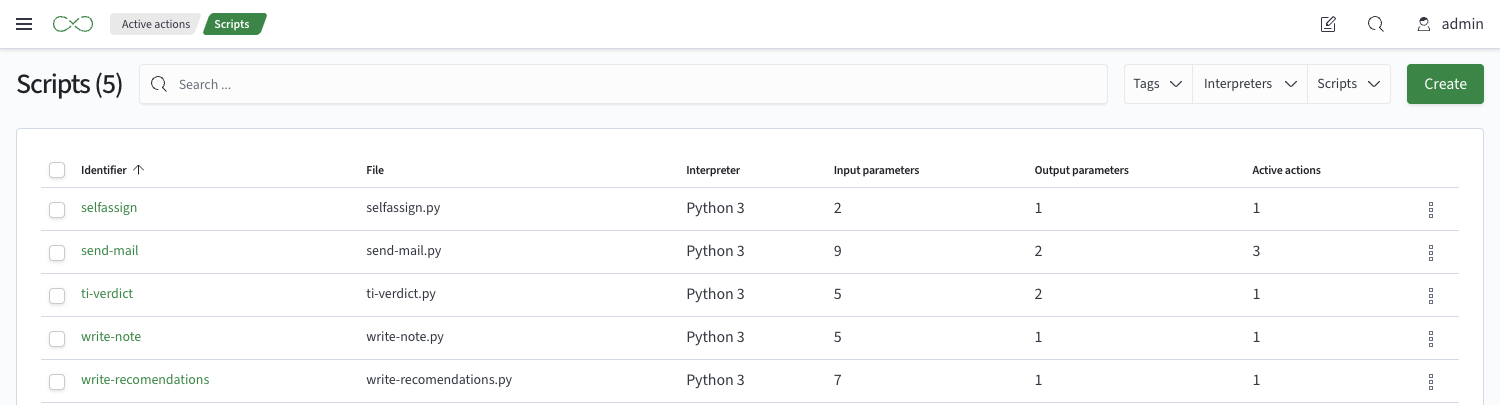
Script Configuration
The script configuration contains two tabs:
General— execution parameters, the script contract and linked active actionsCode— the content of the script file
Execution Parameters
Identifier— the unique script name. The script code is automatically saved to a file named after the identifier with the extension that matches the interpreterInterpreter— the script runtime, selected from the interpreter directory. Only Python is supported in the current versionExecution timeout, s— the maximum script run time. If the script does not finish in time, Smart Monitor stops waiting for the result, and the run gets a status with an unknown resultPass the full context— if selected, in addition to the declared input parameters, the script receives the run data set: search results in Job Scheduler and the incident in Incident Manager
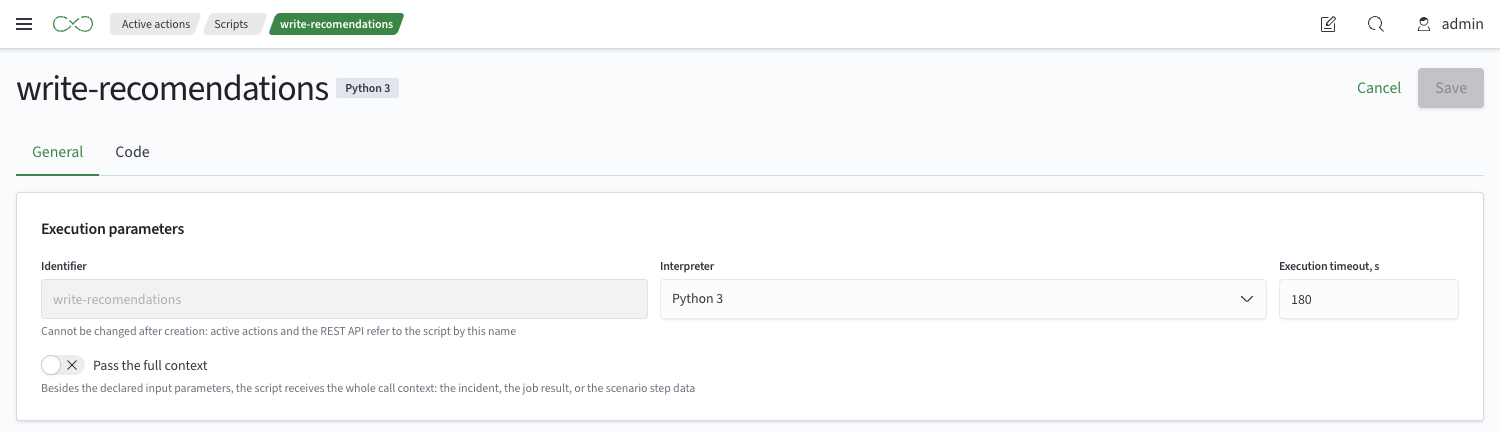
An interpreter is the path to the runtime executable on the script execution node and the runtime type.
The script takes third-party libraries from the environment of its interpreter.
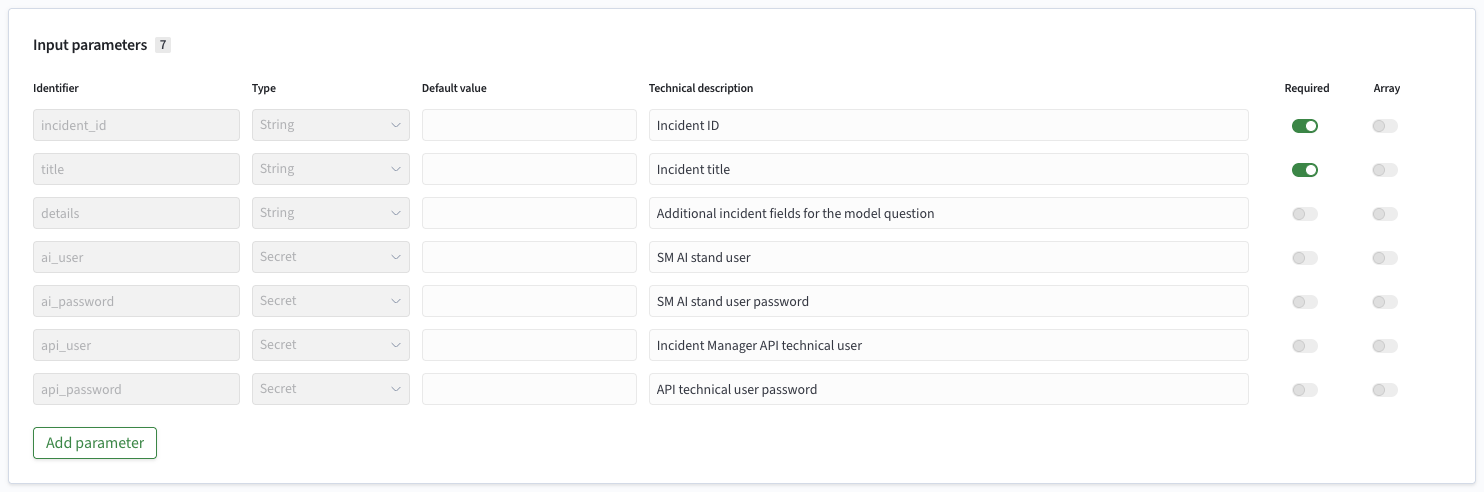
Input Parameters
Input parameters describe the data the script expects to receive. For each parameter, you set:
IdentifierType—String,Number,BooleanorSecretArray— indicates that the script receives a list of values of the specified type instead of a single value. See Array Parameters for detailsDefault value— the value passed to the script by default. The value type must match the parameter type: a number for aNumberparameter,trueorfalsefor aBooleanparameterRequired— indicates that the script cannot run without this parameterTechnical description— an explanation of the parameter purpose
Use the Secret type for passwords, tokens and similar values. Its value is stored in the keystore.
Input parameter identifiers must be unique.
At launch, the script receives all declared input parameters. The value of each parameter is determined as follows:
- The value set for the run. Values have the following priority, in descending order: entered by the user, set in the application point, set in the action card
- If the value is not set anywhere, the default value from the script settings is used
- If there is no default value either, an empty value (
None) is passed
Array Parameters
The Array flag is available only for String and Number parameters:
| Parameter type | Array flag | Default value |
|---|---|---|
String | available | flag cleared — a single string; flag selected — a list of strings |
Number | available | flag cleared — a single number; flag selected — a list of numbers |
Boolean | not available | a single value |
Secret | not available | a single value |
In the active action card, an array parameter is populated using a Multi-select field; the script receives it as a list (list).
Returned Parameters
Returned parameters describe the result the script returns after it runs. For each parameter, you set the context path, type and description.

Linked Active Actions
The block lists the active actions created based on the script and their call sites.
Check this block before changing or deleting a script: if at least one active action is created on the script, some changes are prohibited. See Changing a Script in Use for details.

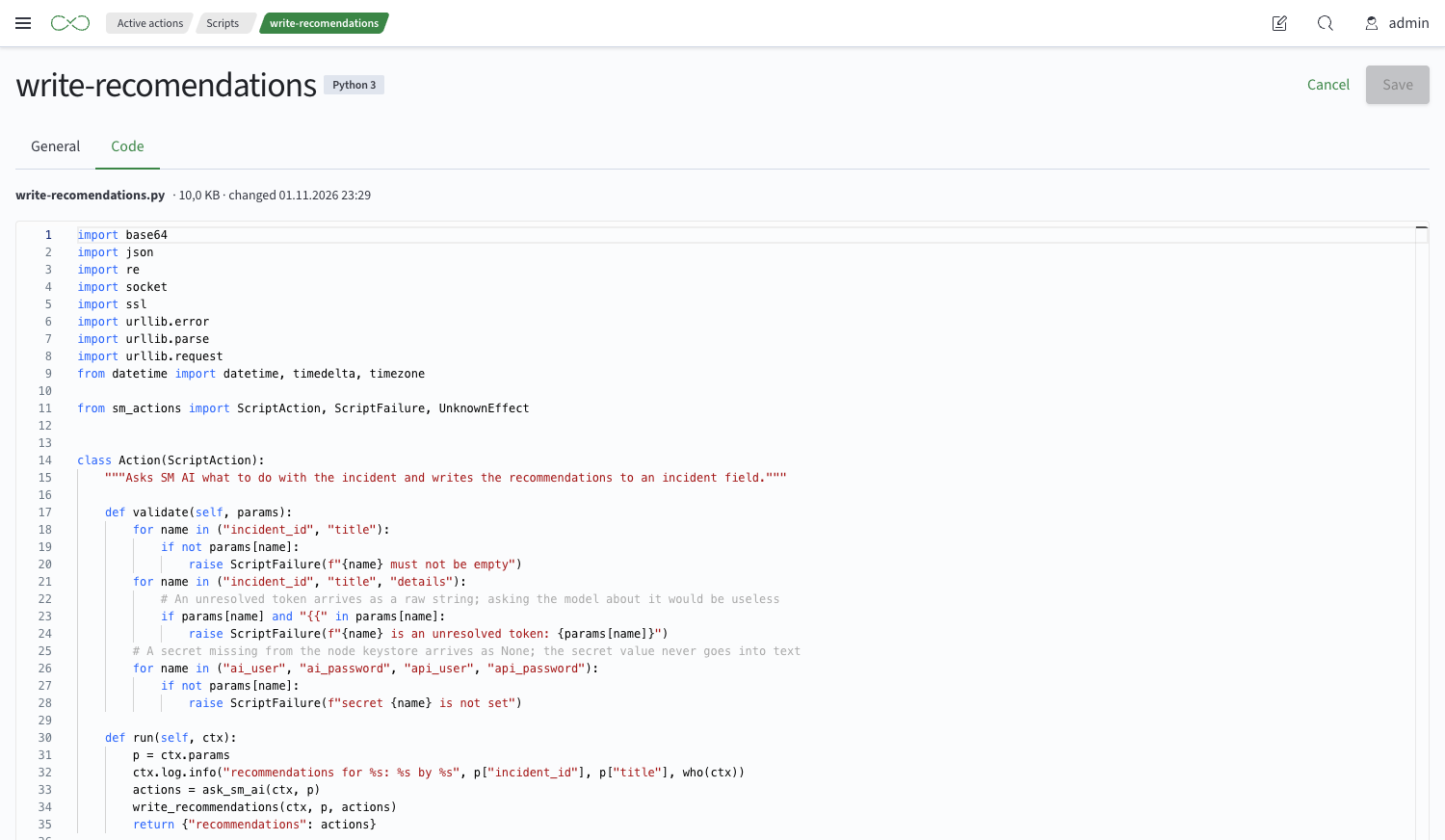
Script Code
The Code tab shows the content of the script file, its name and the time of the last change. The code can be edited and saved in the interface.
Changing a Script in Use
A script is in use if at least one active action is created based on it. Such a script can be changed only so that the configured actions still match it.
Prohibited Changes
| Where | Prohibited change |
|---|---|
| Input parameter | Delete or rename |
| Input parameter | Change the type |
| Input parameter | Select or clear the Array flag |
| Input parameter | Add a required parameter without a default value |
| Input parameter | Make a parameter required if it has no default value |
| Input parameter | Remove the default value of a required parameter |
| Returned parameter | Delete, rename or change the type |
| Script | Delete the script, including as part of a bulk delete |
Changing the default value or description of a parameter in the script does not affect the fields of actions that already exist.
Script Contract
A script is a single Python file with a class that inherits ScriptAction from the sm_actions library. The class describes only the action logic. Reading input parameters, passing the result to Smart Monitor and determining the run outcome is done by the loader on the script execution node.
Script file requirements:
- the file declares exactly one class that inherits from
ScriptAction. If there are no such classes or more than one, the script does not load - the script cannot import neighboring modules or other scripts: all code is placed in one file. Shared code is packaged as a library in the interpreter environment
- only the libraries installed by the administrator in the interpreter environment are available
Script Structure
from sm_actions import ScriptAction, ScriptFailure, UnknownEffect


class Action(ScriptAction):

    def setup(self):
        """Optional. Runs once per process:
        imports, clients, model loading. Does not depend on the call parameters."""
        import requests
        self.http = requests.Session()

    def validate(self, params):
        """Optional. Checks the parameters before any external effects."""
        if params["threshold"] < 0:
            raise ScriptFailure("threshold must be >= 0")

    def run(self, ctx):
        """Required. Performs the action and returns a dictionary of returned parameters."""
        resp = self.http.post("https://…", json=ctx.payload, timeout=ctx.remaining())
        if resp.status_code >= 500:
            raise UnknownEffect(f"API returned {resp.status_code}")
        return {"verdict": resp.json()["verdict"]}

    def teardown(self):
        """Optional. Runs once when the process stops:
        close what setup opened."""
        self.http.close()
Class methods:
| Method | Required | Purpose |
|---|---|---|
setup() | no | Preparation that does not depend on the call parameters: imports, external system clients, model loading. Runs once per process |
validate(params) | no | Checks the input parameters before calling external systems. An error at this stage guarantees that the action changed nothing |
run(ctx) | yes | The main work of the action. Returns a dictionary of returned parameters |
teardown() | no | Releases the resources opened in setup. Runs once when the process stops. The call is not guaranteed (the process can be interrupted on deadline or on failure) and does not affect the run outcome, so there must be no external effects here |
Create temporary files only in ctx.temp_dir().
Call Context
The run method receives the context object ctx with the following data:
| Attribute | What it contains |
|---|---|
ctx.params | All declared input parameters converted to their types. |
ctx.element | The element the script is called on in per-element processing: the record (record), its position in the set (position, zero-based), and the set size (set_size). In whole-set processing — None |
ctx.set | The set the script is called on in whole-set processing: the list of records records. In per-element processing — None |
ctx.payload | The run data set — a list of raw documents the action is run on. Filled only if the script has the Pass the full context flag selected, otherwise None. For convenience, use ctx.element or ctx.set. |
ctx.run | Run information: the run identifier run_id, the action identifier action_id and the deadline deadline (UTC, calculated from the timeout) |
ctx.meta | Run metadata: who started the action, from where and on what. See Metadata for details |
ctx.remaining() | The number of seconds left until the deadline. Use it as the timeout for calls to external systems so that the script meets the deadline on its own |
ctx.log | The script log. Entries go to the run diagnostics |
ctx.temp_dir() | The temporary directory of the call. Created on first access and deleted after the call completes |
Exactly one of ctx.element and ctx.set is always set — the script uses it to determine the processing mode. The record contents (ctx.element.record, ctx.set.records) are passed only if the script has the Pass the full context flag selected, otherwise they are None. The mode and the element position in the set (position, set_size) are always passed.
Input Parameters in ctx.params
ctx.params is a dictionary of all input parameters declared in the script, in declaration order. The same dictionary is passed to validate(params). Every declared parameter is always present in the dictionary, so there is no need to check whether a key exists.
The values are converted to the declared type:
| Parameter type | Python value |
|---|---|
String | str |
Number | int if the value is an integer, otherwise float |
Boolean | bool |
Secret | str from the keystore or None |
| Array | list of values of the parameter type |
The value of a secret parameter is taken from the keystore on the node where the script runs. If a required secret parameter is not set, the script does not run.
Do not write secret parameter values to the script log or to exception messages: both go to the run history.
Pass ctx.remaining() to network request timeouts. Then, if an external system responds slowly, the script finishes on its own with a clear error instead of being interrupted by the execution timeout with an unknown outcome.
Metadata
ctx.meta contains three attributes:
| Attribute | What it contains |
|---|---|
ctx.meta.call | The call site and time: scope — the call site (INCIDENT_MANUAL_SCOPE, INCIDENT_WORKFLOW_SCOPE, INCIDENT_SLA_SCOPE, JOB_SCHEDULER_SCOPE), time — the logical call time (datetime, UTC) |
ctx.meta.run_as | On whose behalf the action runs: the user name name, the list of roles roles and the mode mode (AS_INITIATOR, AS_STORED_ROLES, AS_SYSTEM). None if the call site did not pass it |
ctx.meta.object | The object the action is run on: the type type, the identifier id and the title title. None if the call site did not pass it |
Metadata is for reference only: a missing or invalid value arrives as None and does not interrupt the call.
Run Outcome
The run outcome depends on how the script finished:
| How the script finished | Outcome | What it means |
|---|---|---|
run returned a dict or None | Success | The action is done. None means an empty result |
An exception during import, in setup or in validate (including a deadline interrupt in validate) | Failure (FAILED) | run was never reached, there were no external effects |
run raised ScriptFailure | Failure (FAILED) | The script guarantees it changed nothing in the external system. The run can be safely repeated |
run raised UnknownEffect | Unknown (UNKNOWN) | The action in the external system may have happened. A human checks the result before a retry |
run raised any other exception or called sys.exit() | Unknown (UNKNOWN) | run may have failed after it had already called the external system |
run was interrupted at the deadline or the process was killed on timeout | Unknown (UNKNOWN) | The action may have completed |
run returned something other than a dict, or a value that cannot be converted to JSON | Unknown (UNKNOWN) | The action is done, but the result could not be read |
run returned an undeclared key or a value of a different type | Failure (FAILED) | The result does not match the script contract |
The exception message is saved as the outcome reason in the run history.
run returns a dictionary in which the key is the identifier of a return parameter and the value has the declared type.
The script must return all parameters declared in its card: subsequent actions and application points use each of them. It can return None instead of a dictionary only if it has no return parameters.
Dictionary requirements:
- keys must be flat and match the parameter identifiers exactly, including dots: the
ticket.idparameter is returned as{"ticket.id": 42}, not as{"ticket": {"id": 42}} - string is
str, number isintorfloat, and Boolean isbool; lists and dictionaries are not allowed as values - values must be serializable to JSON by standard Python libraries; convert
datetime,Decimalandbytesto a string or a number beforehand - the result size must not exceed the execution node limit (10 MB by default)
Choose the exception based on whether the action was performed in the external system. Use ScriptFailure only when it is known for sure that the action was not performed: for example, the parameters failed validation or the external system returned a response that guarantees the action was not performed. If the request may have been performed but no response was received, use UnknownEffect; a person must check the result before the run is repeated.
Deadline and Log
Shortly before the timeout expires, the loader interrupts validate or run with the sm_actions.DeadlineExceeded exception. It inherits from BaseException, so except Exception does not catch it. Do not catch it in your code: finally and with blocks still run when the call is interrupted. An interrupted run gets the UNKNOWN outcome, and if the deadline has fully expired, the script process is killed. Interruption on deadline does not replace timeouts of external calls — use ctx.remaining().
ctx.log is a standard logging.Logger that writes to the process stderr. The last stderr entries (up to 64 KB) and stdout go to the run diagnostics: with the INFO level for a successful outcome, otherwise with the ERROR level.
Debugging a Script
You can run a script locally, without Smart Monitor, by passing the input data from a JSON file:
Script files are stored on nodes with the sm-actions plugin in the /app/opensearch/scripts directory.
PYTHONPATH=<loaders/python directory from sme-re> python3 -m sm_actions.run script.py input.json
Example input.json:
{
  "contractVersion": 1,
  "run":     { "runId": "local-1", "actionId": "local", "deadline": "2030-01-01T00:00:00Z" },
  "params":  { "threshold": 5, "host": "srv-1", "token": "dev-token" },
  "payload": [ { "user": "ivanov", "ip": "10.0.0.1" } ],
  "meta": {
    "call":   { "scope": "INCIDENT_MANUAL_SCOPE", "time": "2026-10-21T09:15:03Z" },
    "runAs":  { "name": "ivanov", "roles": ["analyst"], "mode": "AS_INITIATOR" },
    "object": { "type": "incident", "id": "inc-42", "title": "Password brute force on srv-1" }
  }
}
Field names in input.json use camelCase; the same fields are available in ctx in snake_case: runId — ctx.run.run_id, runAs — ctx.meta.run_as.
The loader runs setup, validate, run and teardown in sequence and prints the result to stdout: {"outputs": {...}} or {"error": {"message": ..., "effect": ...}}. There is no deadline interruption in a local run.
OpenSearch Node Settings for Script Execution
| Setting | Default | Type | Description |
|---|---|---|---|
sm.actions.script.deadline_margin | 2s | Static | How much shorter the script process deadline is than the call deadline: SME RE kills the process before the plugin cancels the request. |
sm.actions.per_element.max_elements | 100 | Dynamic | Limit on the number of set elements for a per-element call, one setting for all action types. |
Interpreter Directory API
Interpreters are created, changed, and deleted through the API, for example in the Dev Tools console. An interpreter record contains the following fields:
| Field | Type | Required on creation | Limit | Description |
|---|---|---|---|---|
name | string | yes | up to 256 characters | The interpreter name shown in the script configuration |
path | string | yes | up to 1024 characters | The path to the runtime executable on the script execution node |
type | string | yes | up to 1024 characters | The runtime type. The script file extension depends on the type. In the current version — python |
The interpreter identifier is set in the request path on creation and cannot be changed. Scripts refer to the interpreter by this identifier.
The requests require separate interpreter permissions, listed in Permissions.
Getting Interpreters
List of all interpreters:
GET _core/script_interpreters
One interpreter by identifier:
GET _core/script_interpreters/<identifier>
Creating an Interpreter
All fields are required:
POST _core/script_interpreters/python3
{
  "name": "Python 3",
  "path": "/usr/bin/python3",
  "type": "python"
}
Changing an Interpreter
Pass only the fields to change; the rest remain unchanged. A passed field cannot be an empty string.
PUT _core/script_interpreters/python3
{
  "path": "/opt/python3.11/bin/python3"
}
A change of the path or type applies to all scripts that use the interpreter.
Deleting an Interpreter
Deleting one interpreter:
DELETE _core/script_interpreters/python3
Bulk delete:
POST _core/script_interpreters/bulk_update/delete
{
  "ids": {
    "user": ["python3", "python3_legacy"]
  }
}
An interpreter used by at least one script cannot be deleted: the request returns a 400 error with the text Interpreters [<identifier>] are used by scripts: move the scripts to another interpreter before deleting. In a bulk delete, the request is rejected if at least one of the listed interpreters is in use. Before deleting, move the scripts to another interpreter.
Permissions
Access can be configured both for individual scripts and for all of them at once.
For individual scripts, access is configured with the Permissions button.
To view all scripts at once, grant the cluster permission cluster:admin/sm/adhoc_scripts/read_all; to create scripts — cluster:admin/sm/adhoc_scripts/create; to change and delete them — cluster:admin/sm/adhoc_scripts/write_all.
To create an active action based on a script, in addition to the active action permissions, the read permission for this script or for all scripts (cluster:admin/sm/adhoc_scripts/read_all) is required.
Access to interpreters is checked by their own cluster permissions. It is granted for all interpreters at once; permissions for an individual interpreter are not configured:
| Permission | Allows |
|---|---|
cluster:admin/sm/script_interpreters/read | Viewing interpreters |
cluster:admin/sm/script_interpreters/create | Creating interpreters |
cluster:admin/sm/script_interpreters/write | Changing and deleting interpreters |
For a user to be able to create a script, grant them the permission to view interpreters (cluster:admin/sm/script_interpreters/read) and to create scripts (cluster:admin/sm/adhoc_scripts/create).