Deleted IoC Statistics
The Threat Intelligence: Deleted IoC Statistics dashboard lets you view indicators that have expired and restore selected IoCs to the active database.
Indicators remain in the recycle bin for 30 days after being moved there. To view data, select Period at the top of the dashboard. The default period is the last two months.
IoC Metrics
Three cards are displayed at the top:
- Number of IoCs in the recycle bin for the period — number of indicators moved to the recycle bin during the selected period
- Percentage of IoCs in the recycle bin relative to the active database — number of indicators in the recycle bin as a percentage of active IoCs
- Average IoC lifetime — average number of days from record creation to expiration
The percentage and average lifetime are calculated across the entire recycle bin.

IoC Distribution in the Recycle Bin
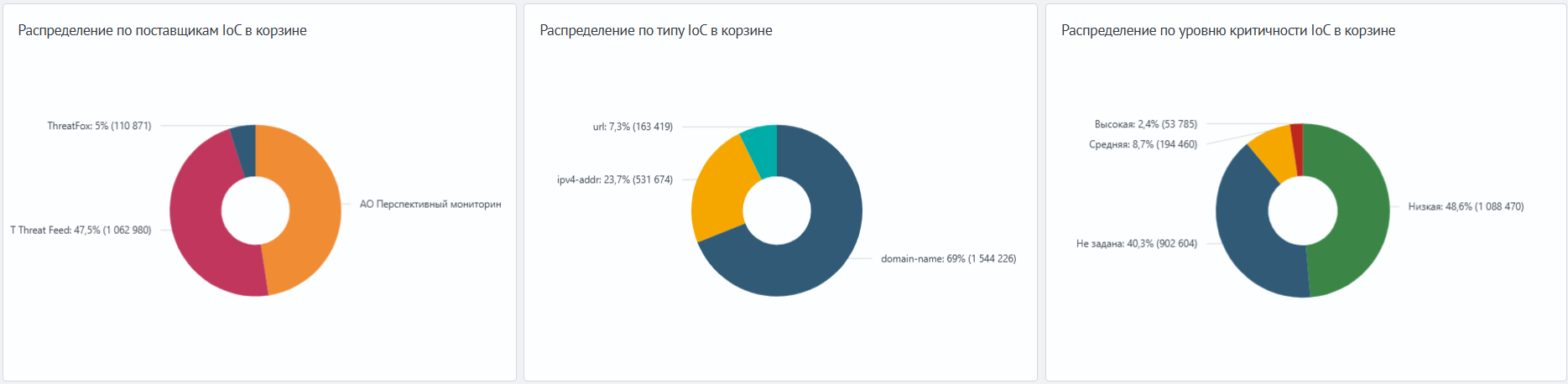
Pie charts show the distribution of indicators by provider, IoC type, and severity. Use them to assess the contents of the recycle bin for the selected period.
Recycle Bin and Deletion Trends
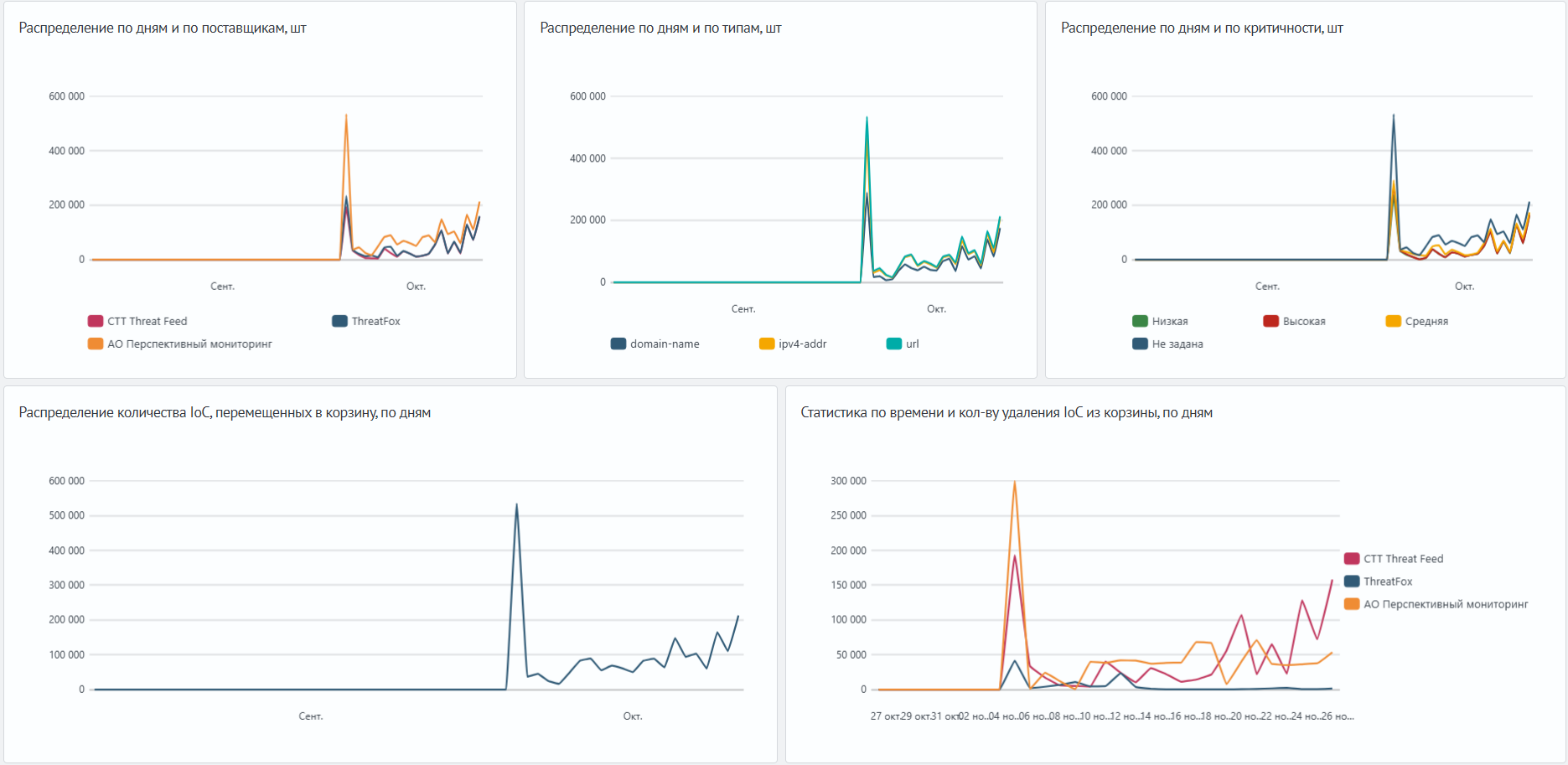
The charts show the number of IoCs moved to the recycle bin per day, including the total and breakdowns by provider, type, and severity.
The scheduled deletion chart shows estimated dates when the 30-day retention period ends, broken down by provider. Use it to identify indicators that may need to be restored soon.
Provider Statistics
The table shows the following metrics for each provider:
| Metric | Description |
|---|---|
| Active IoCs | Number of indicators in the active database. |
| In the recycle bin | Number of indicators in the recycle bin. |
| In the recycle bin relative to the active database, % | Ratio of IoCs in the recycle bin to IoCs in the active database. |
| Average lifetime, days | Average number of days from record creation to expiration. |
| To be deleted within 1 day | Indicators whose retention period ends within the next 24 hours. |
| To be deleted within 2–3 days | Indicators whose retention period ends in 2–3 days. |
| To be deleted within 4–7 days | Indicators whose retention period ends in 4–7 days. |
The Total row contains aggregate metrics. The table shows data for all time and displays 10 rows by default.

Detailed IoC Statistics
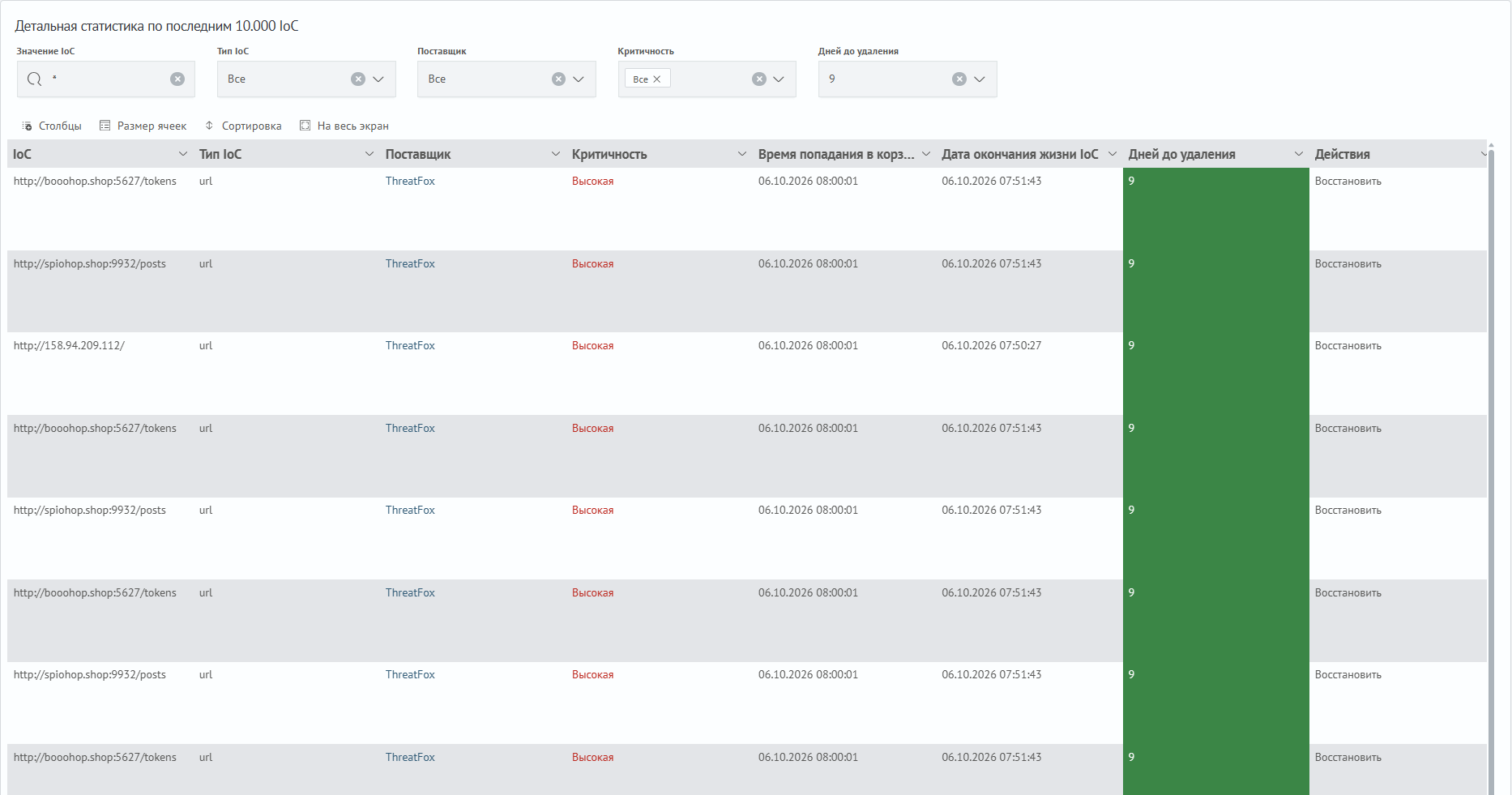
The table contains the IoC value, type, provider, severity, time moved to the recycle bin, expiration date, days until deletion, and the Restore action. The table displays 50 rows by default.
Use the following filters to search:
IoC Value— enter an IP address, domain, URL, or hashIoC Type— select an indicator typeProvider— select an IoC sourceSeverity— select a severity levelDays Until Deletion— select the number of days remaining before permanent deletion. The value is compared with the rounded number of days
The default value is 1 day. To find other indicators, select the appropriate number of days. When opening this dashboard from the active database provider statistics, the filter is set to 30 days.
Restoring IoCs
- Find the required indicator using the detailed table filters
- In its row, select
Restore - Run the query opened by the
drilldown - Reload the recycle bin dashboard to refresh the panels
- Open the active database dashboard and find the indicator in the
Restored IoCssection
When restored, the indicator is returned to the active database with a new 90-day expiration period and removed from the recycle bin.
The IoC lifecycle script handles retention and restoration.
The screenshots in this article currently show the Russian-language interface. They are temporary and will be replaced with English-language screenshots.