Installing the Utility
Table of Contents
Overview
Use the ai_security_ko_maker utility to deploy AI Security module objects that are not included in the content module.
The utility installs the following objects:
| Object Type | Objects |
|---|---|
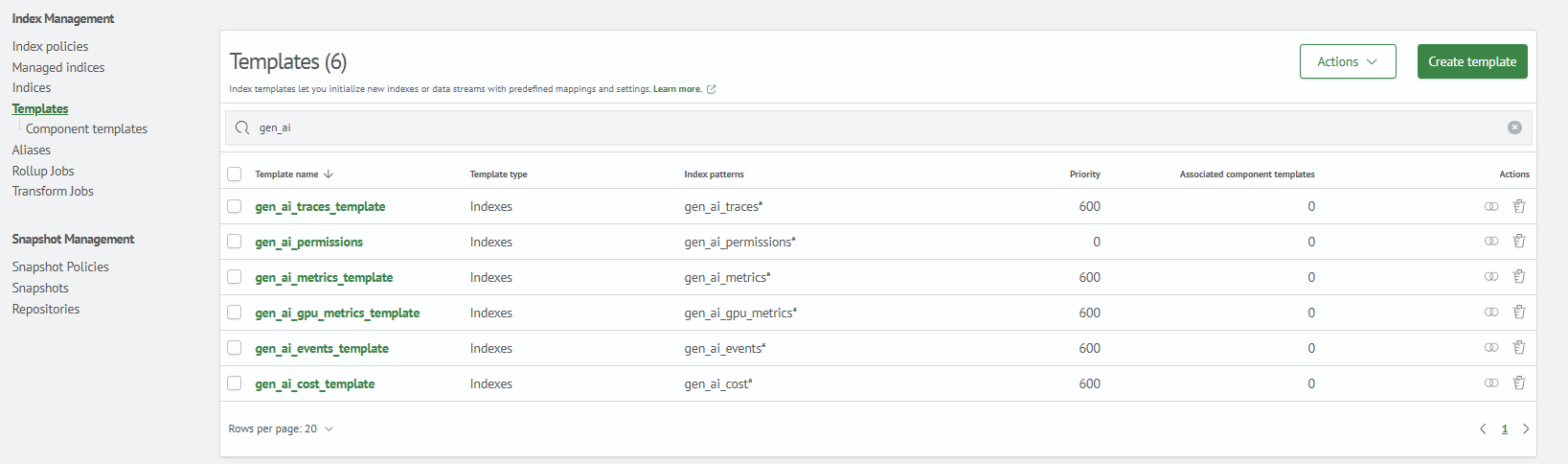
| Index templates | gen_ai_events*, gen_ai_gpu_metrics*, gen_ai_permissions* |
| Index patterns | Patterns for the same gen_ai_* indexes |
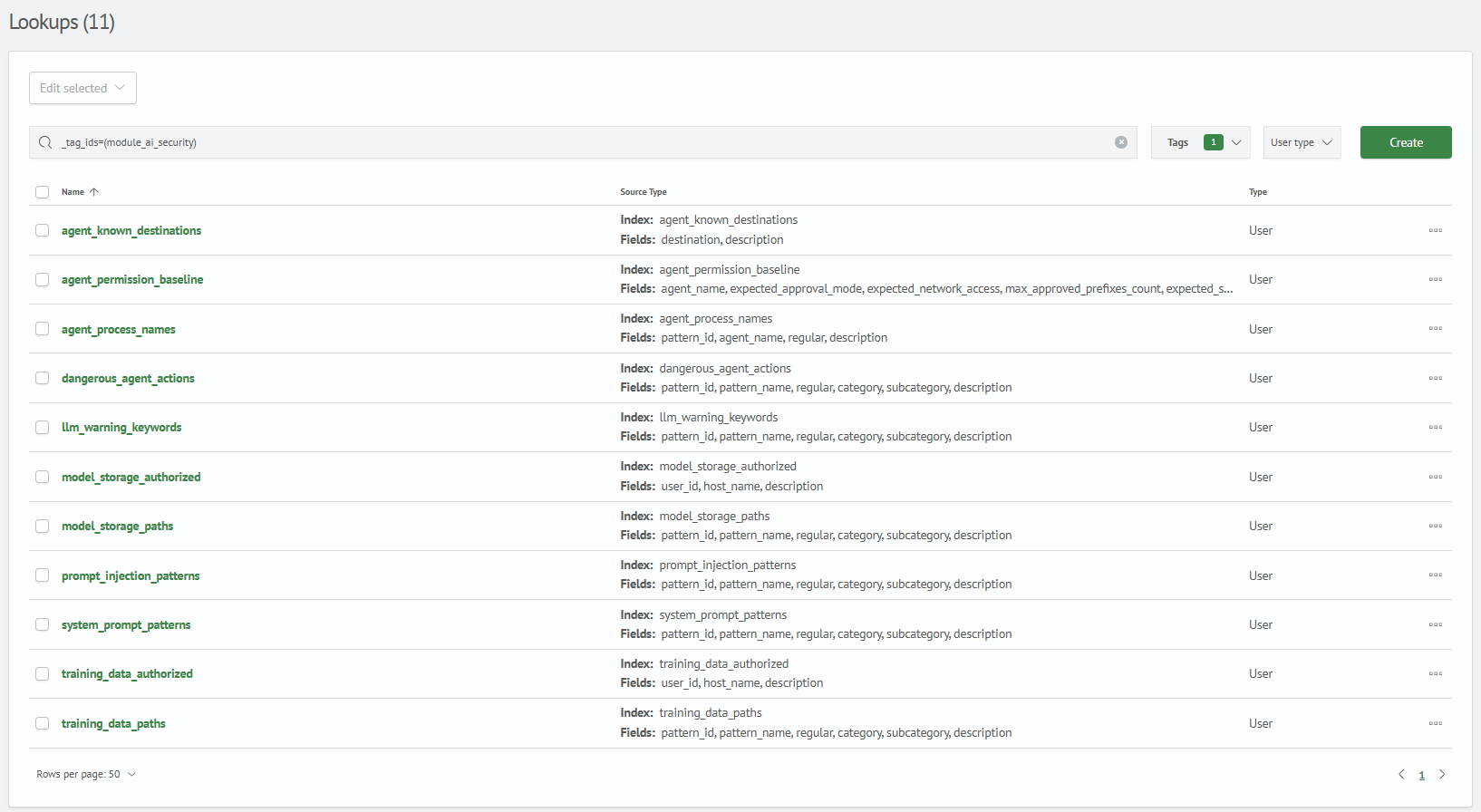
| Lookups | Attack signatures and baseline values |
| Incident type | Incident card fields and the Security Incident incident type |
Installation Procedure
Step 0. Utility Requirements
- Python 3.x
- access to the
Smart Monitorcluster with administrator privileges - network access to the frontend API on port
5601and the OpenSearch API on port9200
Step 1. Install the Utility Dependencies
./bin/install_dependencies.sh
Step 2. Deploy the Utility Objects
./bin/make_ai_security.py \
  --sm_host <SMART_MONITOR_HOST> \
  --sm_api_port <SMART_MONITOR_API_PORT> \
  --sm_cluster_port <OPENSEARCH_PORT> \
  --sm_user <SMART_MONITOR_USER> \
  --sm_password '<SMART_MONITOR_PASSWORD>'
| Parameter | Required | Default | Description |
|---|---|---|---|
--sm_host | Yes | - | Smart Monitor IP address or host name |
--sm_api_port | No | 5601 | Frontend API port used for saved objects and lookup definitions |
--sm_cluster_port | No | 9200 | OpenSearch API port used for index templates and lookup data |
--sm_user | Yes | - | User name |
--sm_password | Yes | - | User password |
Optional parameters:
--skip-index-templates,--skip-index-patterns,--skip-lookups- skip the corresponding object type--skip-lookup-data- create lookup definitions without importing data from CSV files--lookup-id- deploy only the specified lookup; this argument can be provided more than once--dry-run- show the planned operations without sending requests
--sm_api_port is used for the frontend API and lookup definitions, while --sm_cluster_port is used to import index templates and lookup data.
If the frontend API and OpenSearch are exposed on different hosts, specify --sm_api_host and --sm_cluster_host explicitly.
Step 3. Verify the Deployed Utility Objects
1. Index Templates
Verify that the index templates are available after deployment:
Main Menu - System Parameters - Index Management - Templates
2. Index Patterns
Verify that the index patterns are available after deployment:
Main Menu - System Parameters - Module Settings - OPENSEARCH - Index Patterns

3. Lookups
Verify that the 11 module lookups are available after deployment:
Main Menu - Lookup Manager - Lookup List
Step 4. Register the Module Incident Type
After importing the AI Security content module, run apply_incident_types.py from the same ai_security_ko_maker utility. The script creates the Security Incident incident type and assigns it to the module jobs.
./bin/apply_incident_types.py \
  --sm_host <SMART_MONITOR_HOST> \
  --sm_api_port <SMART_MONITOR_API_PORT> \
  --sm_user <SMART_MONITOR_USER> \
  --sm_password '<SMART_MONITOR_PASSWORD>'
After the script completes, verify the following:
- the
Security Incidentincident type is available underMain Menu-Incident Manager-Incident Types - the incident type is assigned to the module's scheduled jobs
Removing Objects
Run the rollback script to remove all deployed objects:
./bin/remove_ai_security.py \
  --sm_host <SMART_MONITOR_HOST> \
  --sm_api_port <SMART_MONITOR_API_PORT> \
  --sm_cluster_port <OPENSEARCH_PORT> \
  --sm_user <SMART_MONITOR_USER> \
  --sm_password '<SMART_MONITOR_PASSWORD>'