Data Sources
General Information
The Data Sources section in KWC is a unified information and reference base where you can collect and store descriptions and configurations of all data sources used in the system.
The Data Sources section solves the following tasks:
-
Centralized information storage. All information about data sources is collected in one place and accessible through the web interface. This eliminates the need to connect to servers to view configurations or search for required parameters
-
Simplified information search. Thanks to the filtering and search system, you can quickly find the required data source by name, description, or tags without spending time on manual analysis of configuration files on servers
-
Documentation in the workflow. Maintaining records about data sources directly in the KWC interface allows keeping documentation up-to-date without the need to maintain separate files or wiki pages
Creation
When navigating to Navigation Menu - Knowledge Center - Data Sources, you will see a list of sources that exist in the system. To create a new source, click the Create button.

Here you can also filter notes by tags or find the required source using the search.
Source Parameter Setup
A source consists of the following parameters:
- Data source name (required parameter)
- Source description (required parameter)
- Logstash configuration
- OpenSearch configuration
- Smart Beat configuration
- Tags
Data Source Name
You need to specify the source name.

Source Description
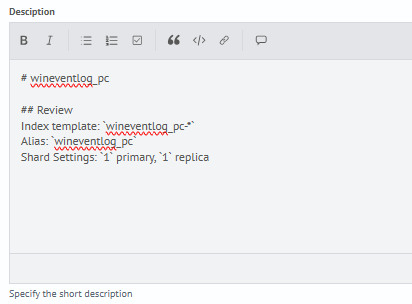
You need to add a description. The description is set in md format.
Logstash Configuration
If Logstash configuration is used for this source, you can add its content.

Usually Logstash configurations are located on the Logstash server in the directory: /app/logstash/config/conf.d/.
OpenSearch Configuration
If an index template is used for this source, you can add its content.

Index template settings can be found in Navigation Menu - Settings - Index Management - Templates. Select a specific index, then click View JSON and copy the content.
Smart Beat Configuration
If data collection is performed through Smart Beat, you can add the content of the application configuration for the Smart Beat agent.
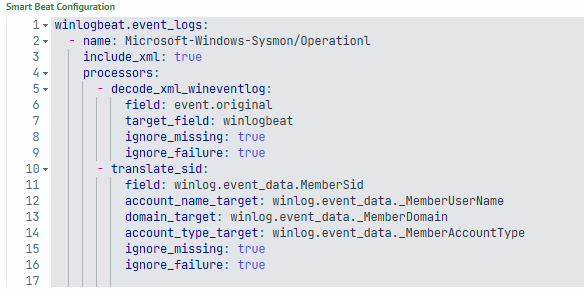
The application configuration for the Smart Beat agent can be found in Navigation Menu - Settings - Smart Beat Management - Applications. Select a specific application and copy the content of the Configuration parameter.
Tag Setup
You can additionally select tag(s) from the list.

Saving
To save, click Save in the lower right corner of the window.

Parameter Setup Result
After saving the settings, a new data source description will be added to KWC. An example of the result is presented in the screenshot below:

Additional Settings
For a source, you can configure access rights similar to other Smart Monitor objects through the context menu located to the right of the object and accessible by clicking the three dots symbol. You can also configure access rights by opening the required source, then clicking Permissions in the upper right corner of the window.

Editing
To edit an existing source, you can select the Edit item through the context menu on the right or open the required source, then click Edit in the upper right corner of the window.

Deletion
To delete an existing source, you can select the Delete item through the context menu on the right.
