Connection Settings for the api Command
The api command supports using preconfigured connection settings. Their names are passed to the command through the connection parameter.
To create or edit a connection, navigate to:
Main Menu - Settings - Module Settings - Configuration List:
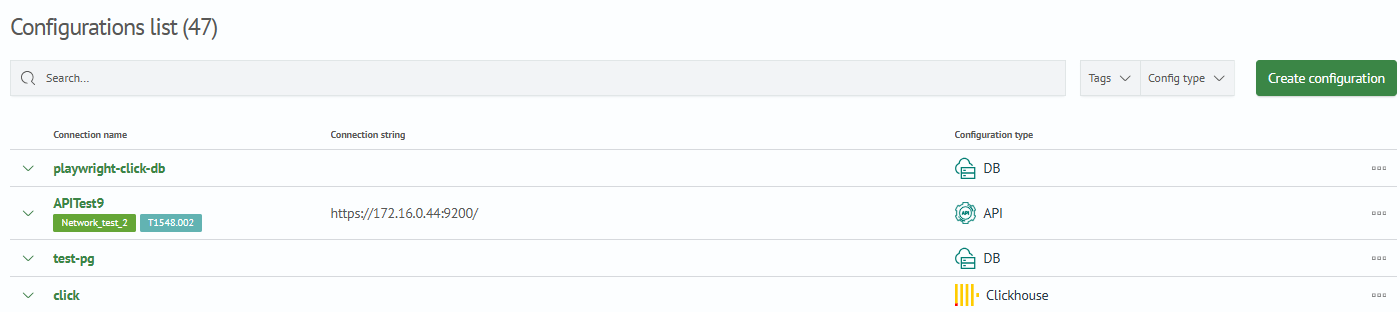
To create a new connection, click Create Configuration in the top-right corner.
To edit a connection, select it from the list. The following is an example of a completed connection configuration:

The table below lists the main connection parameters:
| Name | Description | Example |
|---|---|---|
Configuration Name | The configuration name used as the connection parameter in the api command. | test-connection, example |
Server URL | The URL of the server to which the request is sent. | http://example.com |
Proxy Server URL | The URL of the HTTP proxy server. | 72.10.160.156:8080, http://72.10.160.156:8080 |
Select Authorization Type | The authorization type. For Basic, specify a username and password; for ApiKey and Bearer, specify a key. The password and key are stored in keystore. | Basic, ApiKey, Bearer |
SSL Validation | SSL validation using certificates. | Basic, ApiKey, Bearer |
Enable Host Name Verification | Verification of the host name specified in the certificate. | true, false |
Request Timeout, ms | The maximum wait time for a response to the request, in milliseconds. | 100 |
Select SSL Option | The cryptographic protocol to use. The default is TLS1.3. | SSL3, TLS, TLS1.3 |
Path to trust_store | The path to the self-signed certificate. If a path is specified, you must specify the Certificate Password, which is stored in keystore. | /path/to/your/sertificate.jks |
Before saving the configuration, you can click Check Connection.
