Using the eval command and functions
The eval command is intended to override values in fields. Can use mathematical operations, string concatenation, comparison expressions, Boolean expressions, functions.
eval uses data types:
StringNumericBooleansNull
The eval command requires that the field values correspond to the operation type and seeks to preserve the original data type in the resulting value. For example, with the exception of addition, arithmetic operations may not produce valid results if the values are not numeric. When concatenating values with a dot ., the eval command defines both values as String, regardless of their actual type.
The eval command can work with conditional operators.
In the if and case constructs in the body of the condition, you can use comparison functions (in, like, isnull, isnotnull, etc.) and simple logical expressions.
String concatenation
The query will create a new field destination.geo.location based on the pattern destination.geo.city_name/destination.geo.continent_name.
source sm_cs_threat_indexes
| eval destination.geo.location=destination.geo.continent_name + "/" + destination.geo.city_name
| table destination.geo.location, destination.geo.continent_name, destination.geo.city_name
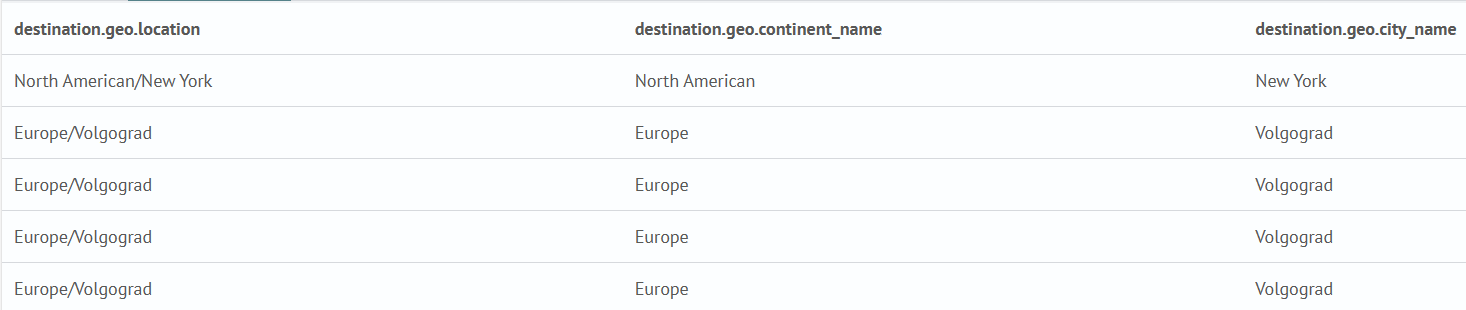
Creating a new field from a service field
The query will output several fields in a table and a new field Index ID. The value of the Index name field will be assigned from the index service field.
source  sm_cs_auth_indexes
| table destination.address, destination.ip, source.ip, event.action
| eval index_name = _index
| rename destination.address as "Target server address", destination.ip as "Target server IP", source.ip as "Source IP", event.action as "Event", index_name as "Index ID"

Using conditional statements if, case
This example uses an if statement. The outcome field can take two values: success and failure. The eval command will create a new result field and write a value to it if the outcome field value is success, otherwise the outcome field will be set to failure.
source wineventlog-*
| table outcome, result
| eval result = if(outcome == "success", "All is cool!", "Alarm!")
| rename outcome as "Outcome", result as "Result"

This example uses the search command to limit the search to three event.action field values (logged-out, logged-in, logon-failed), then the case command will compare these three values with the specified parameters.
source wineventlog-*
| search event.action.keyword="logged-out" OR event.action.keyword="logged-in" OR event.action.keyword="logon-failed"
| table destination.ip, source.ip, event.action
| eval result=case(event.action == "logged-out", "EXIT", event.action == "logged-in", "IN", event.action == "logon-failed", "Alarm!")
| rename destination.ip as "IP destination", source.ip as "IP source", event.action as "Action", result as "Result"

Using boolean expressions
This example uses the search command to limit the search to three event.action field values (logged-out, logged-in, logged-in-special), then, a combination of the if conditional statement and the logical expression or is used to compare the values of the event.action field.
source wineventlog-*
| search event.action.keyword="logged-out" OR event.action.keyword="logged-in" OR event.action.keyword="logged-in-special"
| table destination.ip, source.ip, event.action
| eval result = if(event.action=="logged-in" OR event.action == "logged-in-special" , "Authorization completed", "Session ended")
| rename destination.ip as "IP destination", source.ip as "IP source", event.action as "Action", result as "Result"

Using the like command
This example uses the search command to limit the search to three event.action field values (logged-out, logged-in, logged-in-special, logon-failed), then the value of the first argument is checked to match the pattern specified in the second argument. If the value of the event.action field matches the %logged% pattern, the result field is assigned the value All is cool!, otherwise Alarm! Logon Failed!.
source wineventlog-*
| search event.action.keyword="logged-out" OR event.action.keyword="logged-in" OR event.action.keyword="logged-in-special" OR event.action.keyword="logon-failed"
| table destination.ip, source.ip, event.action
| eval result = if(like(event.action,"%logged%"), "All is cool!", "Alarm! Logon Failed!")
| rename destination.ip as "IP destination", source.ip as "IP source", event.action as "Action", result as "Result"

Mathematical and statistical operations
This example will show the total cost of the order for each user.
source food_orders
| stats latest(total_price) as "total_price_USD" by user_id
| rename user_id as "User ID"

This example will convert the field total_price_USD to total_price_eur (will convert the price from usd to eur), and with the help of the round command, round it to two decimal places.
source food_orders
| stats latest(total_price) as total_price_usd by user_id
| eval total_price_eur = round((total_price_usd * 1.09),2)
| table total_price_usd, total_price_eur, user_id
| rename total_price_usd as "Final price USD", total_price_eur as "Final price EUR", user_id as "User ID"

Working with text values
The query will convert the contents of the snyk.vulnerabilities.credit field to uppercase.
source  sm_cs_vulnerability_indexes
| table snyk.vulnerabilities.cvss3, snyk.vulnerabilities.identifiers.alternative, snyk.vulnerabilities.credit
| eval snyk.vulnerabilities.credit_upper = upper(snyk.vulnerabilities.credit)

The trim command allows removing a substring from a field's value according to a pattern. The following query will add a new field snyk_trim and assign it the value of the snyk.vulnerabilities.identifiers.alternative field with the substring SNYK- removed.
source  sm_cs_vulnerability_indexes
| table snyk.vulnerabilities.credit, snyk.vulnerabilities.credit, snyk.vulnerabilities.identifiers.alternative
| eval snyk.vulnerabilities.credit_upper = upper(snyk.vulnerabilities.credit)
| eval snyk_trim = trim(snyk.vulnerabilities.identifiers.alternative, "SNYK-")

The replace command will replace the value of the snyk_trim field with the second and third matched groups in the regular expression, i.e., the text after the first -.
source  sm_cs_vulnerability_indexes
| table snyk.vulnerabilities.credit, snyk.vulnerabilities.credit, snyk.vulnerabilities.identifiers.alternative
| eval snyk.vulnerabilities.credit_upper = upper(snyk.vulnerabilities.credit)
| eval snyk_trim = trim(snyk.vulnerabilities.identifiers.alternative, "SNYK-")
| eval snyk_replace = replace(snyk_trim, "(\w+)\-(\w+)\-(\w+)", "$2-$3")
