UBA Installation and Initialization
Information
Prerequisites
The following files are required for installation:
- archive with the
sm-ubamodule files for OpenSearch - archive with the
smartMonitorUserBehaviorAnalyticsmodule files for OpenSearch Dashboards
Notations
OS_HOME- OpenSearch home directory, usually/app/opensearch/OSD_HOME- OpenSearch Dashboards home directory, usually/app/opensearch-dashboards/
Installation Process
Installation on OpenSearch servers is performed using the following command:
sudo -u opensearch $OS_HOME/bin/opensearch-plugin install file://<path to the module archive>
Installation on OpenSearch Dashboards servers is performed using the following command:
sudo -u opensearch $OSD_HOME/bin/opensearch-dashboards-plugin install file://<path to the module archive>
Add the uba.sme.pass key to the OpenSearch keystore on every node of the following: SA Data Storage and SA Master Node (with the module installed):
When executing the command, use the user password (by default admin) on behalf of which requests to SME will be made.
sudo -u opensearch $OS_HOME/bin/opensearch-keystore add uba.sme.pass
After installing the module, perform the actions listed in the articles OpenSearch Dashboards and OpenSearch.
Initialization
To initialize the module, go to Main Menu - Settings - Management - UBA - Update:
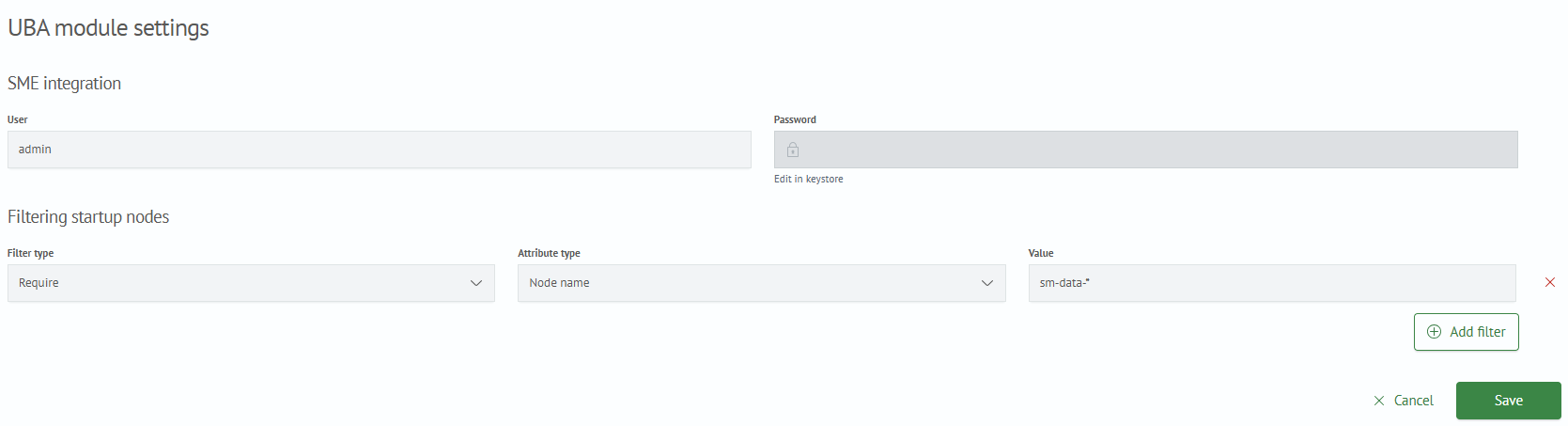
Integration with SME
In the User parameter, enter the account name whose password was entered in the OpenSearch keystore during the Installation process.
The Password parameter is non-editable and managed through the OpenSearch keystore.
Node Filtering
By default, profiling policy tasks, scoring calculations, and object population will be launched on all servers with the UBA module installed. Filters allow you to regulate the set of nodes used for launching tasks.
The following filter types are available:
- Include – at least one of the conditions must be satisfied
- Exclude – none of the conditions can be satisfied
- Require – all conditions must be satisfied
The following attribute types are available:
- Node name
- Host IP address
- Public IP address of the host
- IP address
- Host Name
- Node ID
- Own attribute
The Value field contains the node parameter.
When using a custom attribute, a field will appear for specifying its name:

After clicking the Initialize button, you will be prompted with a warning about adding system scoring types. If there are no objections, click the Accept button:

Cluster settings
The setting sm.uba.system.indices.rotation is available starting from version 5.3.1.
| Setting | Default value | Description |
|---|---|---|
sm.uba.dictionary_refresh_scroll_timeout | 60000 | Timeout for accessing the index with objects during policy calculation (in milliseconds) |
sm.uba.system.indices.rotation | DAILY | Frequency of UBA system indices rotation |
List of values for the cluster setting of index rotation frequency:
DAILY- every dayWEEKLY- once a weekNONE- no rotation
The rotation frequency setting is case-insensitive.
Adding a Section to the Main Menu
To add the module component to the menu, go to the Main Menu - Settings - Module Settings - Menu Settings - JSON Structure section. Add the JSON dictionary below to the data list.
Menu User Behavior Analytics
{
   "itemType":"module",
   "name":"user-behavior-analytics",
   "show":true,
   "id":"9f9a7da3-1aa4-48e3-a40e-20480bdf2ceb",
   "title":"User Behavior Analytics",
   "sections":[
      {
         "itemType":"page",
         "name":"policies",
         "show":true,
         "id":"45b72fdf-9741-4e77-9f49-97753713d4ca",
         "title":"Calculation Policies",
         "enabled":true
      },
      {
         "itemType":"page",
         "name":"object-list",
         "show":false,
         "id":"5c9f64d7-b1c3-4806-8bc6-fe029c218106",
         "title":"Objects",
         "enabled":true
      },
      {
         "itemType":"page",
         "name":"configuration-list",
         "show":false,
         "id":"72b45bd6-8f1f-4c82-8e05-29f5a1b358ab",
         "title":"Configurations",
         "enabled":true
      },
      {
         "itemType":"page",
         "name":"scoring-calculations",
         "show":true,
         "id":"f8b499be-b18a-4265-bbc1-1675bf6dfaa5",
         "title":"Scoring Calculation Rules",
         "enabled":true
      }
   ],
   "enabled":true
}