Configuring Data Collection Connection from BI.ZONE EDR
Legend:
${LS_HOME} - Logstash home directory, typically /app/logstash
General Description
Configuration for collecting data from the BI.ZONE EDR server is performed by setting up Smart Monitor Data Collector configurations.
Generating BI.ZONE EDR API Token
-
Log in to the
BI.ZONE EDRweb interface
-
Go to the
My Profile-API Tokenssection
-
Create an API token and copy it for further use
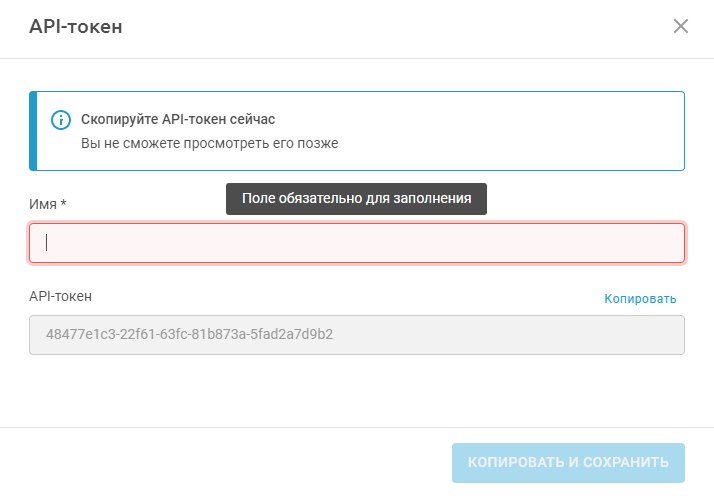
After creation, the API token will not be visible for viewing. Save it during the module installation.
Adding Variables to the Keystore
To implement data collection, variables with identification and authentication data for BI.ZONE EDR must be added to the Smart Monitor Data Collector keystore.
Execute the following commands sequentially:
sudo -u logstash ${LS_HOME}/bin/logstash-keystore add bizone_token
sudo -u logstash ${LS_HOME}/bin/logstash-keystore add bizone_user
sudo -u logstash ${LS_HOME}/bin/logstash-keystore add bizone_password
Installing Smart Monitor Data Collector configurations
Configuration files (pipelines) are supplied with the module and require additional editing according to the addressing of your Smart Monitor and BI.ZONE EDR installations.
In the .conf configuration files, edit the following parameters:
"BIZONE_HOST"in the input section, replace with the actualBI.ZONE EDRserver address"HOST_OS_DATA"in the output section, replace with the actualSmart Monitor Data Storagenode address"KAFKA_SERVERS"in the input section, replace with the actual Kafka server address ofBI.ZONE EDR
Selecting and configuring configuration files for Apache Kafka:
The module comes with two sets of configuration files that use Apache Kafka from the BI.ZONE EDR installation as a data source. The choice of the required set depends on whether Kafka uses a TLS connection in your installation:
| Plain Text | TLS |
|---|---|
| bizone-irp.conf | bizone-irp-withssl.conf |
| bizone-server.conf | bizone-server-withssl.conf |
| bizone-tasks-result-event.conf | bizone-tasks-result-event-withssl.conf |
| bizone-telemetry.conf | bizone-telemetry-withssl.conf |
In the configuration files that use Kafka as a data source, topic names are specified. Change them if your BI.ZONE EDR installation uses topics with different names.
By default, only server authentication is used on the Kafka server in the EDR installation. Accordingly, the lines calling keystore and its password are commented out in the configuration files. If mutual authentication (mTLS) is used in your installation, uncomment the corresponding lines in the files.
Create a truststore and place the Kafka server CA certificate in it.
Add a variable with the truststore password to the Smart Monitor Data Collector storage:
sudo -u logstash ${LS_HOME}/bin/logstash-keystore add KAFKA_TRUSTSTORE_PASSWORD
If mutual authentication is used in your installation, also create a keystore and add a variable with the password to the Smart Monitor Data Collector storage:
sudo -u logstash ${LS_HOME}/bin/logstash-keystore add KAFKA_KEYSTORE_PASSWORD
To install the configuration files, perform the following actions:
- Go to the
Smart Monitor Data Collectorhost - Place the pipeline
.conffiles and thebizonefolder containing scripts in the${LS_HOME}/config/conf.ddirectory - Add pipelines to the
pipelines.ymlfile. More details can be found in the corresponding section in Instructions for creating a typical pipeline - Reload the
Smart Monitor Data Collectornode using the following command:
systemctl restart logstash