File Interaction Panel
The panel allows interaction with the uploaded file in the following ways:
- filter by content and event time
- sort by line number
- format the content
- download the sorted file
- export the file to an index
- reload the file from the server
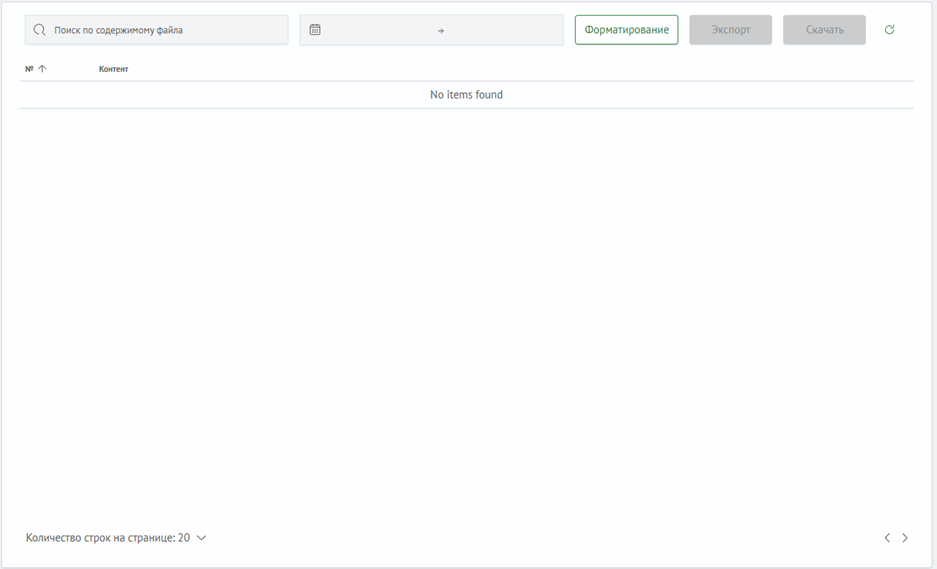
Content Search

In the Search by file content field, you can enter any values. The search is performed based on matches found in the file's lines, regardless of case or where the match is located.
Date and Time Filtering

Within the log date and time filter, there are two fields with corresponding calendars that allow you to set intervals for filtering.
With large file sizes, time-based filtering may not perform as quickly. Filtering only occurs when both dates are selected.
Formatting

Clicking the Formatting button opens a modal window with the last log line, a field for entering a regular expression, an option to enable timestamp display, and an option to include the remaining content after formatting.

The regular expression must use named groups; other types of regex will not work.
Export to Index

Clicking the Export button opens a modal window with a field for entering the index name, the number of rows to export, an option to include the log timestamp in the final export content, an option to include the export time in the final export content, an Export button that exports the selected number of rows, and an Export All button that exports the entire sorted file.

The index name must always start with advanced_log_manager_; otherwise, the file cannot be exported to the index.
File Download

Clicking the Download button downloads a file named FilteredLogs.log to the user's device, containing the sorted but unformatted content of the file.
File Update

Clicking the update button will cause the file to be read again, and the updated content will be displayed on the screen.
This function only works with files read from the server.