Creating Incidents
Incident creation refers to the process of logging and documenting significant events and correlation rule outputs. Depending on operational needs, incidents may be created either automatically (via the Create Incident function) or manually by authorized users.
Creation using "Create Incident"
To create an incident using Create Incident, you must
-
Add this action in the
Active Actionssection in the job editor. -
Fill in the fields in the
Create Incidentaction parameters:
Incident Name- a brief name identifying the incident in the general listSeverity- the importance level of the incidentWorkflow- the workflowIncident Description- a detailed description of the incident; the editor supports Github Flavored MarkdownDetail Type- the format for additional informationSearch- a search query with event or additional information about the incidentLink- a link to additional information, for example, to documentation
Details- a search query or URL providing additional informationIndex Suffix- allows creating incidents in a specific index; seeIndex SuffixesExecution Settings- active action execution settingsDo not run for each result- creates a single incident even if the search returns multiple results
Additional Fields- custom fields defined in the module settingsFields from Search Results- key-value pairs from the search job resultsLocal Parameters- key-value pairs of local and global tokens for dynamic data substitution
Using Tokens
For the Severity field and all fields in the Additional Fields block, you can use search job tokens; see Using Tokens
Creating Manually
To create an incident manually:
- Go to the
Incident Manager - Click the
Create Incidentbutton. A modal window with incident parameters will appear: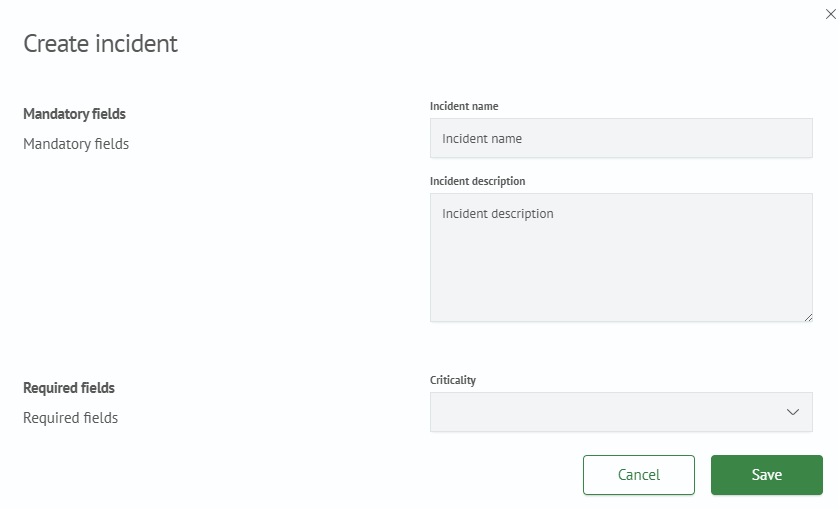
- Mandatory fields:
Incident name- the name of the incident displayed in the general list of incidentsIncident description- a description that is displayed in the general list when the incident details are expanded
- Required fields:
Severity- the importance level of the incidentReviewer- the employee or group of employees responsible for resolving the incident and its consequences
- Additional Information - additional information about the incident
- Click the
Create Incidentbutton. After clicking, the created incident will appear in the general list