Configuring the Incident Card
General Description
The incident card view can be configured in the SM module settings section. To do this, go to Main menu - Module Settings - Incident Manager - Card.
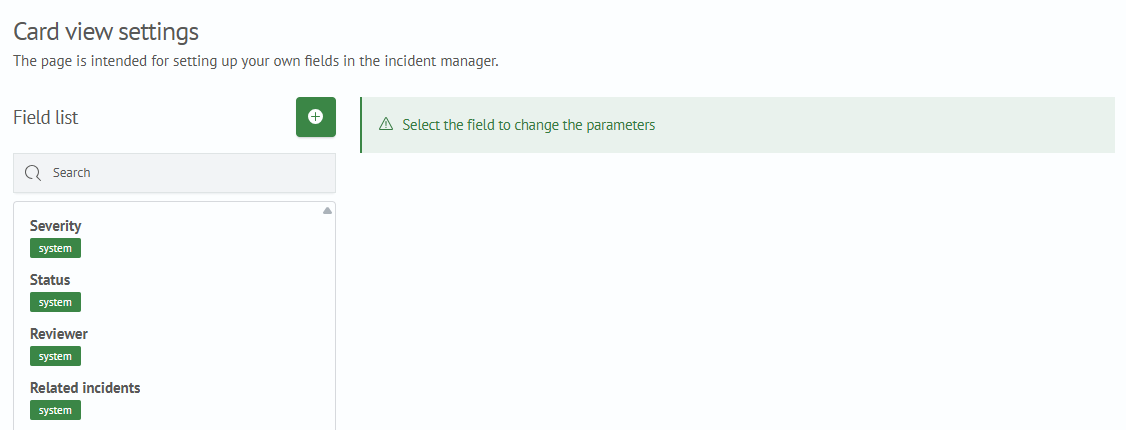
In the settings interface, you can configure the displayed fields. By default, the incident card contains the following fields:
- Severity
- Status
- Reviewer
- Related incidents
Creating New Fields
To create new fields in the incident card settings interface:
- Click the
+button - Fill in the parameters for the new field
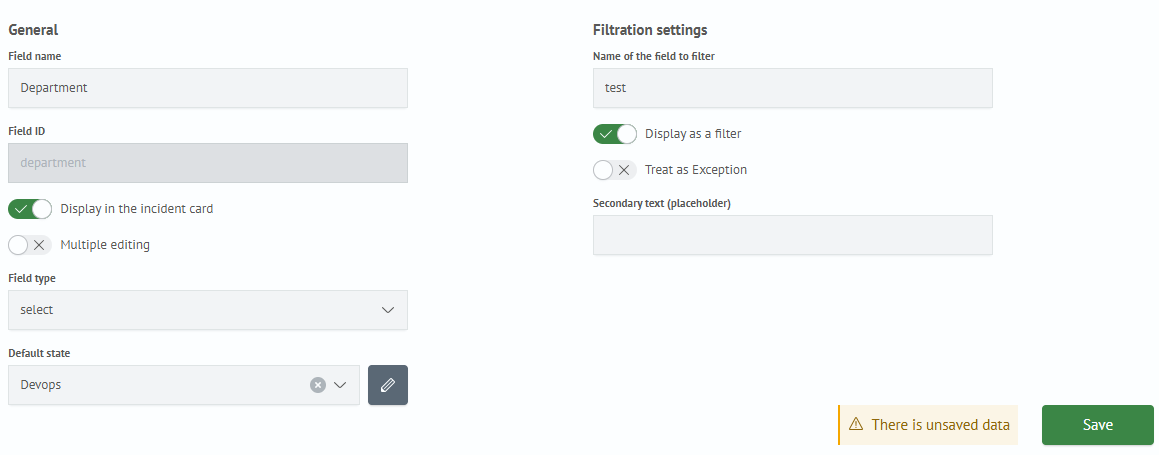
General parameters:
Group Type- field category (Required,Meta,Participants,Additional). Fields of typeSystemare only pre-defined fieldsField Name- name of the new fieldField Identifier- system name of the new fieldDisplay in Incident Card- whether to display the new field in the incident cardDisplay as Filter- whether to display the new field as a filter for searchField Type- data type of the new fieldDefault State- default value
- Click the
Savebutton
Now, when creating an incident, the card will contain the new field.
Editing Existing Fields
To edit a field parameter:
- Select the field from the list and click on it
- The parameter editor for the selected field will appear on the right; make the changes
- Click the
Savebutton
Deleting Fields
To delete a field, click the × button next to the field name. In the dialog box that appears, confirm the action by clicking the Delete button or cancel the action by clicking the Cancel button.