Using tokens
Tokens are data generated after a job is executed. They work as variables and store field values and can be used when creating a job in Job Scheduler.
Types of tokens:
- local - created from the search result. Identified as
{{token_name}}. Exists in the context of a single search result - global - Created from the
Global Parametersvalues of theJob Schedulercomponent. Identified as<global_token_name>. It exists in the context of a single launch of the entire search job
The local token syntax is {{_source.field_name }}, where field_name is the name of the field from the event in the search query. For example, if the field name in the search query is host.ip, then the token for this field is {{_source.host.ip}}.
The global token has the syntax <global_token_name>, where global_token_name is the name of the global token. For example, the token <guid>.
Another type of token is <job-meta-field:field_name>. It allows you to use a field from a query result or a _meta field.
Example. Using Search Query Fields:
| Parameter | Syntax | Description |
|---|---|---|
title | <job-meta-field:title> | Job name |
description | <job-meta-field:description> | Job description |
List of available _meta fields:
| Parameter | Syntax | Description |
|---|---|---|
id | <job-meta-field:_meta.id> | Job ID |
type | <job-meta-field:_meta.type> | Values from the Object Type field in the Job Scheduler module interface |
version | <job-meta-field:_meta.version> | Job Scheduler module version. |
module | <job-meta-field:_meta.module> | Undefined - when creating your own task, SM Cyber Security - when importing from a module SM Cyber Security. |
created | <job-meta-field:_meta.created> | Job creation date |
update | <job-meta-field:_meta.updated> | Job update date |
tag_ids | <job-meta-field:_meta.tag_ids> | List of job tags. Multiple tags are allowed. |
An example of using tokens.
Create a new job in Job Scheduler:
- Name -
RULE - CS - Sysmon - DetectedTaskList - Description - An attempt was detected to view the list of tasks on the host
Next, the incident information is filled in, specifying the search query and time settings:
source sysmon
| search event.code=1 AND command_line="C:\\Windows\\system32\\tasklist.exe"
| aggs count, values(winlog.process.pid) as winlog.process.pid, latest(rule_name_technique_id) as rule_name_technique_id, latest(rule_name_technique_name) as rule_name_technique_name, values(event.action) as event.action, values(host.ip) as host.ip by host.name
| eval title=<job-meta-field:title>
| where count > 1
| table host.name, count, winlog.process.pid, rule_name_technique_id, rule_name_technique_name, event.action, host.ip
- Time interval - Last 60 minutes
- Time field -
@timestamp - Duration of the lock (in seconds) - 60
Frequency of execution:
- Schedule type - Cron Expression
- Cron - 3-59/5 * * * *
- Schedule delay - 0
- Duration - 5 Minutes
- Global Params:
- Key -
guid - Value -
guid()
- Key -
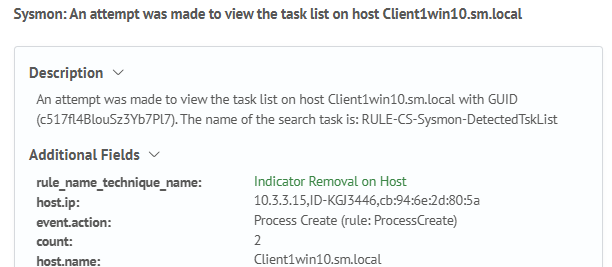
The example uses the local token {{_source.host.name}}, the global token <guid> and the token <job-meta-field:title>:

To use a token of the form <job-meta-field:field_name> you must use the eval command in the search query to write the token's value into a field (the field name can be arbitrary).
When local tokens are used, the _source it is a system object and stores all fields from the search result. In general, the token usage looks like {{_source.field_name}}, where field_name is the name of the field from the search result.
As a result of job being triggered, an incident will be created, tokens are replaced with values.